Credit to fellow ADE Lucy Gray for posting these to her blog!
* Free Online Graph Paper from Incompetech.com
Make PDFs of just about any kind of paper you might need in a school setting here. This site is not just about the graphing kind!
Visit: http://www.incompetech.com/beta/plainGraphPaper/
* PDF Pad
This is a fairly basic graph paper generator that allows you to specify type of paper and size.
Visit: http://www.pdfpad.com/graphpaper/
* Downloadable Graph Paper and Measurement Tools
Not only can you print graph paper at this math and science site, but you can also find printable measurement tools such as centimeter rulers and protractors. It looks like other math and science resources cited here might be worth browsing as well.
Visit: http://www.csun.edu/science/ref/measurement/data/graph_paper.html
* Graphing Worksheets from Teachnology
This site includes printable graph paper as well as graphing activities.
Visit: http://www.teach-nology.com/worksheets/math/graph/
Sunday, November 26, 2006


Saturday, November 11, 2006
Keeping up with technology...
Do you ever feel that technology is advancing too quickly? Do you have a hard time keeping up with the latest trends?
Here are two websites you may want to check out.
ICT Leaders & Learners is a great place to visit for the latest in educational technology. You will discover tools for teachers and students, as well as "people to watch" and links to educational conference webcasts.
http://www.qesnrecit.qc.ca/leader/index.php
Also of interest from Alex Bosworth, is Live Marks. Not specifically for education, this website provides a "live" scrolling feed of websites that are being bookmarked in del.icio.us. It's amazing to watch.
http://sandbox.sourcelabs.com/livemarks/
Here are two websites you may want to check out.
ICT Leaders & Learners is a great place to visit for the latest in educational technology. You will discover tools for teachers and students, as well as "people to watch" and links to educational conference webcasts.
http://www.qesnrecit.qc.ca/leader/index.php
Also of interest from Alex Bosworth, is Live Marks. Not specifically for education, this website provides a "live" scrolling feed of websites that are being bookmarked in del.icio.us. It's amazing to watch.
http://sandbox.sourcelabs.com/livemarks/
Sunday, October 29, 2006
Information Overload?
Did you know...
• It's been said that a single issue of the Sunday New York Times contains more information than a person living in the 18th Century came across in their lifetime?!
In researching the source of this factoid I found several references, such as an article by Ian Jukes (http://ianjukes.com/infosavvy/education/handouts/fgtg.pdf ) who cited the Richard Wurman book, "Information Anxiety."
• There are more than 2.7 billion searches in Google each month, and a total of 6.4 billion searches asked of the top Internet search tools!? (http://searchenginewatch.com/showPage.html?page=2156461)
To whom were these questions asked before the Internet?
If information about information is interesting to you, check out "Google Trends" (http://www.google.com/trends). With Google Trends, you can compare the world's interest in your favorite topics. Enter up to five topics and see how often they've been searched for on Google over time. Google Trends also displays how frequently your topics have appeared in Google News stories, and which geographic regions have searched for them most often.
• It's been said that a single issue of the Sunday New York Times contains more information than a person living in the 18th Century came across in their lifetime?!
In researching the source of this factoid I found several references, such as an article by Ian Jukes (http://ianjukes.com/infosavvy/education/handouts/fgtg.pdf ) who cited the Richard Wurman book, "Information Anxiety."
• There are more than 2.7 billion searches in Google each month, and a total of 6.4 billion searches asked of the top Internet search tools!? (http://searchenginewatch.com/showPage.html?page=2156461)
To whom were these questions asked before the Internet?
If information about information is interesting to you, check out "Google Trends" (http://www.google.com/trends). With Google Trends, you can compare the world's interest in your favorite topics. Enter up to five topics and see how often they've been searched for on Google over time. Google Trends also displays how frequently your topics have appeared in Google News stories, and which geographic regions have searched for them most often.
Sunday, October 15, 2006
Google for Educators!
In July I attended ISTE's National Education Computing Conference (NECC) in San Diego. There was a Google booth and some folks taking names and email addresses for a new "teacher" connection planned for Google. This week, I received my first "Google Teacher Newsletter" which stated, in part,
Visit us at: http://www.google.com/educators for a teacher's guide to 12 Google products. You'll find information about each tool, examples of how educators are using them, and lesson ideas. You'll also find lesson plans and videos from our partners at DiscoveryEducation focusing on two of our most popular teaching tools: Google Earth and Google SketchUp.Google Earth's direct education link is http://www.google.com/educators/p_earth.html. Visit this site for some exemplary education examples, including using resources from our subscription-based video on demand server, unitedstreaming, and an inspiring message from the Discovery Educator Network Directory, Hall Davidson, "Google Earth enables teachers and communities to easily create tremendous collections of work integrating video, 3D buildings, photos, podcasts, or NPR stories."
We think of the site as a basic platform of teaching resources -- for everything from blogging and videos to geographical search tools and 3-D modeling software -- and we want you to fill it in with your great ideas. You can explore a Google tool you've never tried before, then tell us what you think about it. Or road test our lesson ideas, then follow the links to submit your own. And if you'd like to share your expertise with fellow educators, we encourage you to send us your story -- we'd love to feature it in this newsletter or on the site.
Monday, October 02, 2006
PLCs in Pinckney... they "get it!"
Many schools across the nation are either investigating or adopting the Professional Learning Community model, based on the works of DuFour and Eaker. As a regular listener of David Warlick's podcasts, I recently learned about one such school in Pinckney, Michigan (Episode 70, David Gets Geek!ed!). I followed the show links and discovered a wonderful posting by Tom McCurdy and Michael Partridge on "Podcasting and Professional Learning Communities" -- which details their work on adopting the PLC model at an administrative retreat:
Also, worth a listen: Geek!ed! Podcast Episode 034:
http://coverpage.pcs.k12.mi.us/geeked/?page_id=76
"This summer (2006) we were able to apply podcasting to Professional Learning Communities at a leadership workshop in Pinckney, Michigan. We had small groups of school leaders collaborate on questions that challenge PLC’s. We started by using traditional group strategies. Groups discussed a PLC question, recorded their responses on a flip chart, and reported their result to the bigger group. Then we turned on the tech! We gave each group brief instructions in the use of recording software and clustered each group around a microphone and laptop. We let them know that they had twenty minutes to discuss the next PLC question…and the resulting audio file would be posted for the world to subscribe to! The results were stunning. When the groups shared their reactions to being recorded, they unanimously responded that the quality of the conversations increased. The groups were more focused. They were not burdened with trying to record on paper what was being recorded for them. They also felt that they had to rise to a more professional place in these conversations. They reported that they were less likely to verbalize 'stream of thought.' Instead, they more carefully constructed their thinking before speaking. They also reported that they listened to each other more carefully. After the activity, when it was announced that each school would receive a microphone, there was an audible expression of excitement from them. Imagine that."Thanks for sharing Pinckney! Yours is a great model for demonstrating how technology can enhance the learning of our students (or our adults). Podcasting (and blogging) allow students to experience truly authentic learning by providing them with a "real" audience -- not to mention that it's a global one. Students will be challenged to be more focused, concentrate on a higher standard of conversation, and enhance their listening skills. Why would you NOT want to try this in your classroom?
Also, worth a listen: Geek!ed! Podcast Episode 034:
http://coverpage.pcs.k12.mi.us/geeked/?page_id=76
Friday, September 15, 2006
Update on "Unleashing the Potential" -- First Annual K12 Online Conference
Here'a an update on the Online Conference...
There is now a website (http://k12onlineconference.org/) with conference FAQs, profiles of the conference presenters and a link to submit a proposal to present. Proposals are due 9/30/06!
Some great keynoters are lined up... David Warlick, Bud Hunt, Alan Levine, Ewan McIntosh and Anne Davis!
Some "Fireside Chats" will also be available via Elluminate
* Oct 16th at 6 pm Eastern - David Warlick and 4 Conveners
* Oct 26th at 7 pm Eastern: Bud and Allan, Conveners and any Week 1 Presenters
* Oct 28th For Ewan and Ann, and any Week 2 presenters: 11 am Eastern
* Closing Event: The 24 hour continuous K-12 Online Skypecast! (sign-ups will be on an upcoming wiki)
Thanks to organizers Darren Kuropatwa, Sheryl Nusbaum-Beach, Will Richardson and Wesley Fryer!
If you have any questions about any part of this, please feel free to email one of them:
* Darren Kuropatwa: dkuropatwa {at} gmail {dot} com
* Sheryl Nusbaum-Beach: snbeach {at} cox {dot} net
* Will Richardson: weblogged {at} gmail {dot} com
* Wesley Fryer: wesfryer {at} pobox {dot} com
Please duplicate this post and distribute it far and wide across the blogosphere. Feel free to republish it on your own blog.
There is now a website (http://k12onlineconference.org/) with conference FAQs, profiles of the conference presenters and a link to submit a proposal to present. Proposals are due 9/30/06!
Some great keynoters are lined up... David Warlick, Bud Hunt, Alan Levine, Ewan McIntosh and Anne Davis!
Some "Fireside Chats" will also be available via Elluminate
* Oct 16th at 6 pm Eastern - David Warlick and 4 Conveners
* Oct 26th at 7 pm Eastern: Bud and Allan, Conveners and any Week 1 Presenters
* Oct 28th For Ewan and Ann, and any Week 2 presenters: 11 am Eastern
* Closing Event: The 24 hour continuous K-12 Online Skypecast! (sign-ups will be on an upcoming wiki)
Thanks to organizers Darren Kuropatwa, Sheryl Nusbaum-Beach, Will Richardson and Wesley Fryer!
If you have any questions about any part of this, please feel free to email one of them:
* Darren Kuropatwa: dkuropatwa {at} gmail {dot} com
* Sheryl Nusbaum-Beach: snbeach {at} cox {dot} net
* Will Richardson: weblogged {at} gmail {dot} com
* Wesley Fryer: wesfryer {at} pobox {dot} com
Please duplicate this post and distribute it far and wide across the blogosphere. Feel free to republish it on your own blog.
Monday, September 04, 2006
"Unleashing the Potential" at the first annual K12 Online convention!
Announcing the first annual "K12 Online 2006" convention for teachers, administrators and educators around the world interested in the use of Web 2.0 tools in classrooms and professional practice. This year's conference is scheduled to be held over two weeks, Oct. 23-27 and Oct. 30- Nov. 3 with the theme "Unleashing the Potential." There will be four "conference strands"-- two each week. Two presentations will be published in each strand each day, Monday - Friday, so four new presentations will be available each day over the course of the two-weeks. Each presentation will be given in podcast or screencast format and released via the conference blog (URL: TBA).
THE FOUR STRANDS ARE:
Week 1
Strand A: A Week In The Classroom
These presentations will focus on the practical pedagogical uses of online social tools (Web 2.0) giving concrete examples of how teachers are using the tools in their classes. They will also show how teachers plan for using these tools in the delivery of their curricular objectives.
Strand B: Basic/Advanced Training (one of each per day)
Basic training is "how to" information on tool use in an educational setting, especially for newcomers.
Advanced training is for teachers who have already started using Web 2.0 tools in their classes and are looking for: (a) advanced technology training (eg. how to write your own blog template or hack existing ones), (b) new tools they can make use of in their classes, (c) teaching ideas on how to mash tools together to create "something new," (d) a pedagogical understanding of how technologies such as Weblogs, wikis, podcasts, social bookmarking sites, RSS feeds and others can deepen learning and increase student achievement, or (e) use of assessment tools to measure the effectiveness of Read/Write Web technologies in their personal practice and with their students.
Week 2
Strand A: Personal Professional Development
Tips, ideas and resources on how to orchestrate your own professional development online; the tools that support Professional Learning Environments (PLEs); how to create opportunities to bring these technologies to the larger school community; how to effectively incorporate the tools into your personal or professional practice; or how to create a supportive, reflective virtual professional community around school-based goals.
Strand B: Overcoming Obstacles
Tips, ideas and resources on how to deal with issues like: lack of access to tools/computers, filtering, parental/district concerns for online safety, and other IT concerns while trying to focus on best practice in the use of Web 2.0 tools.
Stay tuned for further details.
THE FOUR STRANDS ARE:
Week 1
Strand A: A Week In The Classroom
These presentations will focus on the practical pedagogical uses of online social tools (Web 2.0) giving concrete examples of how teachers are using the tools in their classes. They will also show how teachers plan for using these tools in the delivery of their curricular objectives.
Strand B: Basic/Advanced Training (one of each per day)
Basic training is "how to" information on tool use in an educational setting, especially for newcomers.
Advanced training is for teachers who have already started using Web 2.0 tools in their classes and are looking for: (a) advanced technology training (eg. how to write your own blog template or hack existing ones), (b) new tools they can make use of in their classes, (c) teaching ideas on how to mash tools together to create "something new," (d) a pedagogical understanding of how technologies such as Weblogs, wikis, podcasts, social bookmarking sites, RSS feeds and others can deepen learning and increase student achievement, or (e) use of assessment tools to measure the effectiveness of Read/Write Web technologies in their personal practice and with their students.
Week 2
Strand A: Personal Professional Development
Tips, ideas and resources on how to orchestrate your own professional development online; the tools that support Professional Learning Environments (PLEs); how to create opportunities to bring these technologies to the larger school community; how to effectively incorporate the tools into your personal or professional practice; or how to create a supportive, reflective virtual professional community around school-based goals.
Strand B: Overcoming Obstacles
Tips, ideas and resources on how to deal with issues like: lack of access to tools/computers, filtering, parental/district concerns for online safety, and other IT concerns while trying to focus on best practice in the use of Web 2.0 tools.
Stay tuned for further details.
Wednesday, August 23, 2006
Today.. a tale of technology woes...
I love technology... when it works. Technology is not always reliable... after all, it's just a bunch of ones and zeros that have been manipulated in a variety of ways by programmers so that I can create and edit movies, download and edit digital photographs, create documents, and communicate through a variety of methods (voice, email, web, chat, etc).
The past 2 days have been a bit challenging. In the midst of backing up my files to a portable hard drive early Monday morning (after working through the weekend on a variety of back to school tasks) ... the hard drive on my Powerbook stopped responding when I tried to stop the copying process since it was taking longer than I had expected. When I couldn't stop the process, I chose to "force quit" and relaunch the Finder to get out of the "copying" mode. The computer would not cooperate and I needed to leave for work, so I chose to simply "shut down" the computer.
And now, so sad to report, I have not been able to start it back up. I haven't had a great deal of time to try the various utilities (such as Disk Warrior), but preliminary measures (booting in "target" mode and Safe booting) have been fruitless. I am becoming less confident that I will actually be able to get my data back. I am pretty diligent about backing up at least monthly, and usually archive important files as I create them (to a server or some portable device), just in case of a technolgy failure, so I only stand to lose a few weeks worth of work.
We were also plagued by network glitches today. Our well-planned roll out of Tiger, and Open Directory services has taught us a thing or two. Teachers and staff are becoming restless, it's amazing how much we actually depend on this stuff.
To top it off, I created a nifty movie to present to our back to school celebration this evening, and when playing in full screen mode from iMovie, through a data projector, the soundtrack would simply not keep up with the video... what's with that!? I was presenting from a brand new MacBook with nothing else running, and having almost 30 GBs of free hard drive space. How disappointing and a tad embarassing, since I "am" the technology person.
Oh well, unless you're dead, you can recover from the worst that happens. I hope tomorrow is less problematic.
The past 2 days have been a bit challenging. In the midst of backing up my files to a portable hard drive early Monday morning (after working through the weekend on a variety of back to school tasks) ... the hard drive on my Powerbook stopped responding when I tried to stop the copying process since it was taking longer than I had expected. When I couldn't stop the process, I chose to "force quit" and relaunch the Finder to get out of the "copying" mode. The computer would not cooperate and I needed to leave for work, so I chose to simply "shut down" the computer.
And now, so sad to report, I have not been able to start it back up. I haven't had a great deal of time to try the various utilities (such as Disk Warrior), but preliminary measures (booting in "target" mode and Safe booting) have been fruitless. I am becoming less confident that I will actually be able to get my data back. I am pretty diligent about backing up at least monthly, and usually archive important files as I create them (to a server or some portable device), just in case of a technolgy failure, so I only stand to lose a few weeks worth of work.
We were also plagued by network glitches today. Our well-planned roll out of Tiger, and Open Directory services has taught us a thing or two. Teachers and staff are becoming restless, it's amazing how much we actually depend on this stuff.
To top it off, I created a nifty movie to present to our back to school celebration this evening, and when playing in full screen mode from iMovie, through a data projector, the soundtrack would simply not keep up with the video... what's with that!? I was presenting from a brand new MacBook with nothing else running, and having almost 30 GBs of free hard drive space. How disappointing and a tad embarassing, since I "am" the technology person.
Oh well, unless you're dead, you can recover from the worst that happens. I hope tomorrow is less problematic.
Saturday, August 12, 2006
Videogrunt and Podgrunt --
From the Silicon Valley in California, comes the "grunt" series. I learned about this in the periodic "Apple news" email that I receive. These short episodes are creatively presented in plain English! Whether you are a new or seasoned user of video, this is a great series.
"Videogrunt is an innovative, free video podcast--illustrates the basics of digital video, delivered in short snippets. The informative 'grunt' clips are produced in high-definition video and then scaled down to size for viewing on the gruntmedia website, your personal computer or a video-capable iPod."
http://gruntmedia.com/videogrunt_main.html
Learn something new about video by watching the first four "videogrunt" podcasts.
http://gruntmedia.com/videogrunt_directory.html
And, if you follow the links on this page, you will be able also subscribe to the "podgrunt" series.
http://gruntmedia.com/videogrunt_directory.html
What a great introductory series on the basics of video and audio to share with teachers and students!
"Videogrunt is an innovative, free video podcast--illustrates the basics of digital video, delivered in short snippets. The informative 'grunt' clips are produced in high-definition video and then scaled down to size for viewing on the gruntmedia website, your personal computer or a video-capable iPod."
http://gruntmedia.com/videogrunt_main.html
Learn something new about video by watching the first four "videogrunt" podcasts.
http://gruntmedia.com/videogrunt_directory.html
And, if you follow the links on this page, you will be able also subscribe to the "podgrunt" series.
http://gruntmedia.com/videogrunt_directory.html
What a great introductory series on the basics of video and audio to share with teachers and students!
Wednesday, August 02, 2006
Classroom collaboration online
Last Friday I presented a workshop for the ICE summer series on Classroom Collaboration Tools. Our focus was primarily the use of blogs and wikis, although we briefly looked at the social bookmarking and photo sharing sites (mentioned here previously).
I am particularly fond of wikis as a classroom tool. Teachers can easily create a wiki page for their classrooms and assign student (individually or in teams) to the task of being the "scribe" or notetakers for the day. The wiki environment allows teachers and other students to make corrections, or add to the work of the scribe.
Students can visit the wiki to review the class notes, or answer questions that may need to be clarified. At the end of the course, there is a day to day, or week to week record of what was covered. Wikis can be password protected, editors can elect to have changes emailed to them, and the history of changes and additions make it easy to manage.
Two online sources for creating wikis are pbwiki.com and wikispaces.com. For the summer workshop, I created a pbwiki page at: http://summer-ice.pbwiki.com -- when you visit the pbwiki site, you will discover that it literally takes only 10 seconds to create a wiki page! The other source I would recommend is wikispaces.com, which allows the wiki owner to password protect the information, plus limit who can view the wiki. Check out this Georgia teacher's wikispace for ideas on how wikis can catapult your classroom into the 21st century!
I am particularly fond of wikis as a classroom tool. Teachers can easily create a wiki page for their classrooms and assign student (individually or in teams) to the task of being the "scribe" or notetakers for the day. The wiki environment allows teachers and other students to make corrections, or add to the work of the scribe.
Students can visit the wiki to review the class notes, or answer questions that may need to be clarified. At the end of the course, there is a day to day, or week to week record of what was covered. Wikis can be password protected, editors can elect to have changes emailed to them, and the history of changes and additions make it easy to manage.
Two online sources for creating wikis are pbwiki.com and wikispaces.com. For the summer workshop, I created a pbwiki page at: http://summer-ice.pbwiki.com -- when you visit the pbwiki site, you will discover that it literally takes only 10 seconds to create a wiki page! The other source I would recommend is wikispaces.com, which allows the wiki owner to password protect the information, plus limit who can view the wiki. Check out this Georgia teacher's wikispace for ideas on how wikis can catapult your classroom into the 21st century!
Tuesday, July 25, 2006
What are your favorite websites?
I was recently asked to list my ten most favorite websites. Narrowing the list to 10 is no easy task, since I am always on the lookout for new sites, especially those that may be helpful for educators.
Some of my favorites have been listed in this blog, and a majority are "Web 2.0-based" -- social sites used for collaborating, such as Bloglines, del.icio.us, Furl, Flickr, pbwiki, Wikispaces, and Writeboard.
A great site for educators is USA Today Education Online
which advertises across the banner head, "Improving student performance through relevant, timely, real-world resources." The "Daily Lesson Plan" link (published Tuesdays and Thursdays over the summer) provides a printable 2-page handout for your classroom.
Another site I have recently discovered is NoodleTools. Created by teacher-librarian Debbie Abilock and her son, Damon, NoodleTools provides subscription-based services for schools, although many resources are available on their public website. Send your students to Information Literacy: Search Strategies or NoodleQuest to help them gather resources for their academic research. NoodleQuest is a "Search Strategy Wizard" containing a short form of 9 questions to help students get started.
What are some of your favorite sites?
Some of my favorites have been listed in this blog, and a majority are "Web 2.0-based" -- social sites used for collaborating, such as Bloglines, del.icio.us, Furl, Flickr, pbwiki, Wikispaces, and Writeboard.
A great site for educators is USA Today Education Online
which advertises across the banner head, "Improving student performance through relevant, timely, real-world resources." The "Daily Lesson Plan" link (published Tuesdays and Thursdays over the summer) provides a printable 2-page handout for your classroom.
Another site I have recently discovered is NoodleTools.
Created by teacher-librarian Debbie Abilock and her son, Damon, NoodleTools provides subscription-based services for schools, although many resources are available on their public website. Send your students to Information Literacy: Search Strategies or NoodleQuest to help them gather resources for their academic research. NoodleQuest is a "Search Strategy Wizard" containing a short form of 9 questions to help students get started.What are some of your favorite sites?
Wednesday, July 19, 2006
In over my head... but determined...
I've spent a good deal of time in unfamiliar territory ... "Terminal" land. The quest began earlier today when several teachers in the lab were in search of a calendar template for their classroom planning. We have several "calendar" tools on hand: iCal, Now Up-to-Date, Palm, and Entourage. Each of these are great calendar programs in their own right. And, all seem to require creating and defining "events" which then become listed in the corresponding dates of the calendar.
In the past, teachers have used the nifty "Calendar Assistant" in AppleWorks which creates an AppleWorks Drawing document containing a table with the dates of the specific Month and Year entered when stepping through the assistant. Once the assistant has created the document, in a few clicks, you can change the page set-up to landscape, and drag the corner of the table to fill the page. Text and graphics are easily added by typing in the "dated" cells and inserting clip art from the clippings menu. When finished, the file can be printed to paper, or pdf, or saved as a .jpg file which is suitable for posting to the web (See http://www6.district125.k12.il.us/staffdev/train.html for the summer calendar). Alas, we are standardizing on the "Office" apps and moving away from AppleWorks, since it is being phased out by Apple. I will dearly miss this simple, and elegant application!
So, after a quick review of the templates included with Office, and not finding any calendars, we searched the Microsoft website and located the "Calendars, Labels, Planners, and Stationery" link. The selection looked promising, as there were several "2006-07 academic year" calendar templates among the 28 templates available in the "2007 Calendars" category. The templates are provided for a variety of Microsoft file formats; Visio and Publisher (PC-only), and Word, Excel and PowerPoint.
After locating several that looked good, I clicked the "Download" button only to end up on a page that stated "Your operating system does not meet system requirements. This template could not be downloaded automatically because your operating system does not meet the requirements for downloading Office Online templates." (The files are compressed in the .CAB format, which is not supported on Macintosh.) At the bottom of the page however states, "If you are using a Macintosh operating system, you can find templates at Mactopia Tools on the Web." Ok, so off to Mactopia Tools where we found 437 templates available, but not ONE calendar file for teachers or students (there was one meal planner calendar, but that was it).
So, returning to the "Calendars, Labels, Planners, and Stationery" link, I proceeding to download several of the .cab files. A Google search of "extract CAB files on Macintosh" led me to FileJuicer a program that could decompress the .cab files and also provides several other helpful conversion and extraction tools. FileJuicer is a shareware program, and for $12, seems like a good basic "tool" to own.
Further "Googling" pointed me to an open source (="free") file named "cabextract" that would run as a package for Fink. (The Fink project is an effort to port popular Unix programs to Mac OS X).
So, I proceeded to download and install Fink, and Fink Commander (GUI menu interface) to be able to use cabextract. This is where the scary part comes in. I have used the Terminal application in a few instances, but I am not a UNIX geek by any means, so I basically crossed my fingers and clicked through a series of prompts and was able to get cabextract installed. (I am not sure it's in the best place, but it is working).
In the end, I was able to open Terminal and enter the commands (as listed in the "--help" page) to extract the .cab files into their Word, PowerPoint and Excel templates, which I have re-saved as non-template Office files.
May I whine?! H-E-L-L-O! I think that Microsoft could at least provide these Office templates in a format that can be read and used by Macintosh users. All in all, I suppose that since I learned a little more about UNIX commands and using Terminal, it was worth the time and effort -- and now I have some calendar samples to share with everyone!
In the past, teachers have used the nifty "Calendar Assistant" in AppleWorks which creates an AppleWorks Drawing document containing a table with the dates of the specific Month and Year entered when stepping through the assistant. Once the assistant has created the document, in a few clicks, you can change the page set-up to landscape, and drag the corner of the table to fill the page. Text and graphics are easily added by typing in the "dated" cells and inserting clip art from the clippings menu. When finished, the file can be printed to paper, or pdf, or saved as a .jpg file which is suitable for posting to the web (See http://www6.district125.k12.il.us/staffdev/train.html for the summer calendar). Alas, we are standardizing on the "Office" apps and moving away from AppleWorks, since it is being phased out by Apple. I will dearly miss this simple, and elegant application!
So, after a quick review of the templates included with Office, and not finding any calendars, we searched the Microsoft website and located the "Calendars, Labels, Planners, and Stationery" link. The selection looked promising, as there were several "2006-07 academic year" calendar templates among the 28 templates available in the "2007 Calendars" category. The templates are provided for a variety of Microsoft file formats; Visio and Publisher (PC-only), and Word, Excel and PowerPoint.
After locating several that looked good, I clicked the "Download" button only to end up on a page that stated "Your operating system does not meet system requirements. This template could not be downloaded automatically because your operating system does not meet the requirements for downloading Office Online templates." (The files are compressed in the .CAB format, which is not supported on Macintosh.) At the bottom of the page however states, "If you are using a Macintosh operating system, you can find templates at Mactopia Tools on the Web." Ok, so off to Mactopia Tools where we found 437 templates available, but not ONE calendar file for teachers or students (there was one meal planner calendar, but that was it).
So, returning to the "Calendars, Labels, Planners, and Stationery" link, I proceeding to download several of the .cab files. A Google search of "extract CAB files on Macintosh" led me to FileJuicer a program that could decompress the .cab files and also provides several other helpful conversion and extraction tools. FileJuicer is a shareware program, and for $12, seems like a good basic "tool" to own.
Further "Googling" pointed me to an open source (="free") file named "cabextract" that would run as a package for Fink. (The Fink project is an effort to port popular Unix programs to Mac OS X).
So, I proceeded to download and install Fink, and Fink Commander (GUI menu interface) to be able to use cabextract. This is where the scary part comes in. I have used the Terminal application in a few instances, but I am not a UNIX geek by any means, so I basically crossed my fingers and clicked through a series of prompts and was able to get cabextract installed. (I am not sure it's in the best place, but it is working).
In the end, I was able to open Terminal and enter the commands (as listed in the "--help" page) to extract the .cab files into their Word, PowerPoint and Excel templates, which I have re-saved as non-template Office files.
May I whine?! H-E-L-L-O! I think that Microsoft could at least provide these Office templates in a format that can be read and used by Macintosh users. All in all, I suppose that since I learned a little more about UNIX commands and using Terminal, it was worth the time and effort -- and now I have some calendar samples to share with everyone!
Thursday, July 06, 2006
NECC-ing in San Diego

Lori, Judy and me at NECC
From July 5-7, I spent a whirlwind 3 days at NECC. You too can "attend virtually!"
Listen and learn...
Take a few moments to search the iTunes "Podcast" channel for "NECC" and you will find 19 podcast episodes from sessions at the conference including the keynote address by Nicholas Negroponte who talked about the $100 laptop initiative. View additional pictures on the OLPC wiki page: http://wiki.laptop.org/go/Home

There are additional podcast selections as well, such as "NECC Live" from Kidz Online, "NECC 2006 Poster Sessions from WestEd" and "In the NECC of Time" from Instructional Technology Specialists in update western New York.
Watch and learn...
Be sure to check out the Webcasts from WestEd, available on the NECC website:
http://web.uoregon.edu/ISTE/NECC2006/program/video_on_demand.php
Read and learn...
Many presenters have posted handouts from their sessions online. Browse or search through the NECC Presenters Handouts and Research Papers web page to view the many presentation topics.
And, finally, many NECC-ers have posted their pictures on Flickr... more than 700 (tagged as NECC06) are at:
http://www.flickr.com/photos/tags/necc06/ and about 600+ (tagged NECC2006) are at
http://www.flickr.com/photos/tags/necc2006/
What a great way to virtually attend NECC! Enjoy!
Thanks to ISTE!
Wednesday, July 05, 2006
NECC 2006 - First Impressions....
This week I am attending NECC -- the National Education Computing Conference -- in San Diego, and I will be taking notes and gathering my ideas in this space. I am sitting in the ISTE-SIGTC (Special Interest Group for Tech. Coord). meeting, "The Role of Technology Leadership in a Changing Educational Landscape"
The Panel consists of David Warlick, Will Richardson, Tony Vincent, Thor Prichard, and John Hendron. Thor and John are new names for me -- I am not yet familiar with their work.
Tony shared his use of a "common" del.icio.us account that all teachers can subscribe to, and post links of interest, and then subscribe using an RSS catcher.
The discussion is revolving around the next "wave" of technology for education. Tony thinks it's the availability of online "applications" such as Google spreadsheet and Writely. Students and teachers who are limited by the "locked down" computers that have been placed in their hands, are finding online resources to do their work. Will says to check out http://techcrunch.com to learn about the apps that are coming out each week.
Tony shared a site called "secondlife" -- http://secondlife.com/ -- where you can create a character and "live" in a virtual world.
Thor says, We all love technology... why? He believes it can make our lives easier. It's about change... it's fundamentally less painful to do it the new way, instead of doing it the old way.
Will says that "everyday you have a professional development opportunity when you work with kids." There are a lot of opportunities to learn from our kids.
How do we convince parents that blogging and podcasting is safe? At Willowdale, Tony hosts a parent night to educate parents on the information. David says with the technology available, there can be parent nights every night.
Questions/commnets from the audience...
If teachers are expected to use these sites on their own time, when is their down time? Are we expecting too much of teachers? David mentioned that we are losing teachers because of the current "story" about what it is to be a teacher. Is the expectation that teachers spend their free time grading papers and working with these tools? He says we need to start talking about "Telling a Brand New Story" (BTW... his session is at 2 pm).
A quick summation from the panel...
David: told a story about a session in which he was live blogging during the presentation, and had several comments and conversations that were being carried on, one person was from Tasmania. Think of the possibilities for global communication in our classrooms.
Will: we are in a very disruptive moment now. Our classrooms will need to look and act differently. If we don't, we will become more irrelevant. It's going to get ugly, before it gets better. And, even with all that is available, there is still a digital divide.
John: We should not be engaging in the web 2.0 technologies because they exist. Think about the "sound" ways in which we know are ways to educate students. Then, look at how these tools can enhance or support these.
Part 2...
Thor: we are moving to an activity now to work with some of the online tools. He is taking us through del.icio.us. Bookmarks can be imported and tagged with popular terms. He demonstrated completing the registration process and how to add tags to websites that you bookmark. SIGTC is the tag that we can all use for websites we feel will be helpful to tech coordinators.
There is also a SIGTC "knowledge wiki" for notes, such as these from this morning's info:
http://sigtc.ciservers.net/wiki/index.php/SIGTC_Breakfast_Summary
Onto more learning ...
Technorati Tags: NECC
The Panel consists of David Warlick, Will Richardson, Tony Vincent, Thor Prichard, and John Hendron. Thor and John are new names for me -- I am not yet familiar with their work.
Tony shared his use of a "common" del.icio.us account that all teachers can subscribe to, and post links of interest, and then subscribe using an RSS catcher.
The discussion is revolving around the next "wave" of technology for education. Tony thinks it's the availability of online "applications" such as Google spreadsheet and Writely. Students and teachers who are limited by the "locked down" computers that have been placed in their hands, are finding online resources to do their work. Will says to check out http://techcrunch.com to learn about the apps that are coming out each week.
Tony shared a site called "secondlife" -- http://secondlife.com/ -- where you can create a character and "live" in a virtual world.
Thor says, We all love technology... why? He believes it can make our lives easier. It's about change... it's fundamentally less painful to do it the new way, instead of doing it the old way.
Will says that "everyday you have a professional development opportunity when you work with kids." There are a lot of opportunities to learn from our kids.
How do we convince parents that blogging and podcasting is safe? At Willowdale, Tony hosts a parent night to educate parents on the information. David says with the technology available, there can be parent nights every night.
Questions/commnets from the audience...
If teachers are expected to use these sites on their own time, when is their down time? Are we expecting too much of teachers? David mentioned that we are losing teachers because of the current "story" about what it is to be a teacher. Is the expectation that teachers spend their free time grading papers and working with these tools? He says we need to start talking about "Telling a Brand New Story" (BTW... his session is at 2 pm).
A quick summation from the panel...
David: told a story about a session in which he was live blogging during the presentation, and had several comments and conversations that were being carried on, one person was from Tasmania. Think of the possibilities for global communication in our classrooms.
Will: we are in a very disruptive moment now. Our classrooms will need to look and act differently. If we don't, we will become more irrelevant. It's going to get ugly, before it gets better. And, even with all that is available, there is still a digital divide.
John: We should not be engaging in the web 2.0 technologies because they exist. Think about the "sound" ways in which we know are ways to educate students. Then, look at how these tools can enhance or support these.
Part 2...
Thor: we are moving to an activity now to work with some of the online tools. He is taking us through del.icio.us. Bookmarks can be imported and tagged with popular terms. He demonstrated completing the registration process and how to add tags to websites that you bookmark. SIGTC is the tag that we can all use for websites we feel will be helpful to tech coordinators.
There is also a SIGTC "knowledge wiki" for notes, such as these from this morning's info:
http://sigtc.ciservers.net/wiki/index.php/SIGTC_Breakfast_Summary
Onto more learning ...
Technorati Tags: NECC
Tuesday, June 27, 2006
The Power of Ideas: Stories from Students
I have had the great honor this week of participating in the Discovery Education Network's First Annual Summer Institute held in downtown Chicago. We have participated in awesome presentations by Hall Davidson and Will Richardson. We have learned how teachers and students are blogging, podcasting and telling digital stories, and are sharing and exchanging our ideas for integrating these technologies in the classroom.
One such example of exemplary student work comes from the Mabry school in Georgia. Principal Dr. Tim Tyson runs an annual "movie" festival, and the projects are outstanding. I recommend that you take time to watch this year's award winning "presentation."
http://mabryonline.org/archives/2006/04/2006_film_festi.html
I was most inspired by the student interviews. Students shared their impressions about the process of creating their projects, such as the planning and productions, and the questions they still had as a result of telling their stories. The student learning is clearly evident. This learning will not be easily forgotten. Thank you Dr. Tyson for sharing these student perspectives!
Another project in the works at Mabry is the Global Learning Collaborative, advertised as: "An international collaboration to nurture ambitious, creative, independent problem-solvers who will make the world a better place." Visit http://mabryonline.org/ - and begin thinking about how you can use these ideas with your students -- let's all work to make the world a better place!
One such example of exemplary student work comes from the Mabry school in Georgia. Principal Dr. Tim Tyson runs an annual "movie" festival, and the projects are outstanding. I recommend that you take time to watch this year's award winning "presentation."
http://mabryonline.org/archives/2006/04/2006_film_festi.html
I was most inspired by the student interviews. Students shared their impressions about the process of creating their projects, such as the planning and productions, and the questions they still had as a result of telling their stories. The student learning is clearly evident. This learning will not be easily forgotten. Thank you Dr. Tyson for sharing these student perspectives!
Another project in the works at Mabry is the Global Learning Collaborative, advertised as: "An international collaboration to nurture ambitious, creative, independent problem-solvers who will make the world a better place." Visit http://mabryonline.org/ - and begin thinking about how you can use these ideas with your students -- let's all work to make the world a better place!
Thursday, June 22, 2006
Summer time.... and the living is easy ... or maybe not?
It's summer time in the Staff Development Lab, and we've already hosted several "re-imaging events" in preparation for the coming year. I truly appreciate teachers taking time out of their summer vacations to spend a few hours updating their software. One benefit of updating over the summer, is that teachers get time to explore changes and improvements in preparation for the fall. And, often the question is asked, "Will there ever be a year that we won't have to do this?"
Technology changes rapidly. As new features are written to make software "do more," and improvements are made to hardware, it seems that this is not likely to happen. The computers purchased five years ago, can still compute... but are limited to computing with 5-year-old technology tools. An example would be the recent decision from Microsoft to no longer support the development of Internet Explorer for the Macintosh operating system. If you have used IE to visit websites recently, you may have noticed some unexpected results when trying to retrieve information from some sites, since websites seem to be getting more "sophisticated" and require features available in only newer web browsers.
Overall, most update sessions have gone very smoothly, while others have been a bit "bumpy" as extra time is needed for those who haven't yet backed up their data, or are challenged by hardware glitches. Summer is often more laid back and a perhaps a tad more flexible for most teachers coming in, so having the time to work through the challenges and glitches now, rather than in the fall, certainly helps.
All in all, my favorite part of the process is hearing the stories... what vacations are planned or were taken, family "happenings" or events that have taken place (weddings, births, graduations, engagements, etc.), as well as technology triumphs or challenges that occurred during the year. I also love the time that is spent connecting... "Where/what do you teach?" "How long have you been at Stevenson?" etc.
So, for the most part, the living is easy in the lab these days, and when not particularly easy, I appreciate the opportunity to spend time catching up.
Technology changes rapidly. As new features are written to make software "do more," and improvements are made to hardware, it seems that this is not likely to happen. The computers purchased five years ago, can still compute... but are limited to computing with 5-year-old technology tools. An example would be the recent decision from Microsoft to no longer support the development of Internet Explorer for the Macintosh operating system. If you have used IE to visit websites recently, you may have noticed some unexpected results when trying to retrieve information from some sites, since websites seem to be getting more "sophisticated" and require features available in only newer web browsers.
Overall, most update sessions have gone very smoothly, while others have been a bit "bumpy" as extra time is needed for those who haven't yet backed up their data, or are challenged by hardware glitches. Summer is often more laid back and a perhaps a tad more flexible for most teachers coming in, so having the time to work through the challenges and glitches now, rather than in the fall, certainly helps.
All in all, my favorite part of the process is hearing the stories... what vacations are planned or were taken, family "happenings" or events that have taken place (weddings, births, graduations, engagements, etc.), as well as technology triumphs or challenges that occurred during the year. I also love the time that is spent connecting... "Where/what do you teach?" "How long have you been at Stevenson?" etc.
So, for the most part, the living is easy in the lab these days, and when not particularly easy, I appreciate the opportunity to spend time catching up.
Wednesday, May 31, 2006
What is your global IQ?
Just over a year ago Thomas L. Friedman wrote "The World is Flat: A Brief History of the Twenty-first Century". Friedman talks about how the Indians and Chinese are "racing us to the top" in innovation, and there is nothing that guarantees Americans or Western Europeans will continue leading the way in technology and business. He encourages us as a nation "to work harder, get smarter, attract more young women and men to science and engineering and build the broadband infrastructure, portable pensions and health care that will help every American become more employable in an age in which no one can guarantee you lifetime employment."
According to a recent geographic literacy study by the National Geographic Society and Roper Public Affairs, it would appear that we need to work on more than science and engineering skills. This survey of more than 500 18- to 24-year-olds across the U.S. showed that many young Americans have a limited understanding of our world.
How much do you know about the world? Can you name the world's most spoken primary language? The largest consumer of oil? The most heavily fortified border on the planet? The current population of the U.S.? Could you locate the Cambrian Mountains on a map? Twelve-year-old Bonny Jain, from Moline, IL, could, and his knowledge made him the winner of the recent 2006 National Geographic Bee, that aired on Channel 11 (our local Public Television station) last week. Alex Trebek (of Jeopardy fame) was the moderator of this national competition of 55 fifth to eighth grade participants. While it was inspiring to witness the knowledge of these young folks, it would appear they are the "exception" rather than the rule.
Recently National Geographic and leaders from the business, nonprofit and education communities unveiled a public-engagement campaign designed to give U.S. students tools to become more informed global citizens. The goal of the five-year, multimedia campaign — My Wonderful World — is to improve the geographic literacy of young people ages 8-17 by motivating parents and educators to expand geographic offerings in school, at home and in their communities.
The Web site at the heart of the campaign, MyWonderfulWorld.org, provides resources for parents to help kids be more geo-savvy. It includes suggestions for simple, outdoor family activities and ways that parents can work to get more geography into the classroom, links to geography games and online adventures for kids and teens, classroom materials for educators, and ways for young and old to test their global IQs.
Try this 20-question quiz from the folks at National Geographic.
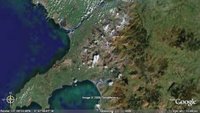
(Oh, and the Cambrian Mountains? Those are the ones that extend across much of Wales, from the Irish Sea to the Bristol Channel.) If you haven't yet discovered (the free) Google Earth http://earth.google.com/, download a copy today and "fly" on over to Wales to have a look.
According to a recent geographic literacy study by the National Geographic Society and Roper Public Affairs, it would appear that we need to work on more than science and engineering skills. This survey of more than 500 18- to 24-year-olds across the U.S. showed that many young Americans have a limited understanding of our world.
- While outsourcing of jobs to India has been a major U.S. business story, almost half those surveyed (47 percent) cannot find the Indian subcontinent on a map of Asia.
- Only 37% of young Americans can find Iraq on a map—though U.S. troops have been there since 2003.
- 6 in 10 young Americans don't speak a foreign language fluently.
- 20% of young Americans think Sudan is in Asia. (It's the largest country in Africa.)
- 48% of young Americans believe the majority population in India is Muslim. (It's Hindu—by a landslide.)
- Half of young Americans can't find New York on a map.
- More than half significantly over-estimate the population of the United States.
- Two-thirds don’t know that the catastrophic earthquake of October 2005 that killed 70,000 people struck in Pakistan.
How much do you know about the world? Can you name the world's most spoken primary language? The largest consumer of oil? The most heavily fortified border on the planet? The current population of the U.S.? Could you locate the Cambrian Mountains on a map? Twelve-year-old Bonny Jain, from Moline, IL, could, and his knowledge made him the winner of the recent 2006 National Geographic Bee, that aired on Channel 11 (our local Public Television station) last week. Alex Trebek (of Jeopardy fame) was the moderator of this national competition of 55 fifth to eighth grade participants. While it was inspiring to witness the knowledge of these young folks, it would appear they are the "exception" rather than the rule.
Recently National Geographic and leaders from the business, nonprofit and education communities unveiled a public-engagement campaign designed to give U.S. students tools to become more informed global citizens. The goal of the five-year, multimedia campaign — My Wonderful World — is to improve the geographic literacy of young people ages 8-17 by motivating parents and educators to expand geographic offerings in school, at home and in their communities.
The Web site at the heart of the campaign, MyWonderfulWorld.org, provides resources for parents to help kids be more geo-savvy. It includes suggestions for simple, outdoor family activities and ways that parents can work to get more geography into the classroom, links to geography games and online adventures for kids and teens, classroom materials for educators, and ways for young and old to test their global IQs.
Try this 20-question quiz from the folks at National Geographic.
(Oh, and the Cambrian Mountains? Those are the ones that extend across much of Wales, from the Irish Sea to the Bristol Channel.) If you haven't yet discovered (the free) Google Earth http://earth.google.com/, download a copy today and "fly" on over to Wales to have a look.

Tuesday, May 23, 2006
Gone Phishing? and SPAM
Planning your Summer Break recreation? From the Federal Trade Commission (FTC) comes this informative "e-card" on phishing -- although, if you haven't yet heard this term, here's a clue -- it doesn't involve water. (Available en español too!)
Visit: http://www.ftc.gov/bcp/conline/ecards/phishing/index.html
Also from the FTC are some very good tips on combatting SPAM (unsolicited and annoying email).
From the "FTC Consumer Feature," Putting a Lid on Deceptive Spam, published July 2002 and available at:
http://www.ftc.gov/bcp/conline/features/spam.pdf
The FTC’s advice to consumers who want to reduce the amount of spam they get is:
** For a "disposable" email address, check out "Spamino"! From their website: "Spamino is like a firewall for email. Spamino receives email for you and forwards only qualified email to an email account you choose. Illegitimate email is held at Spamino for a few weeks and deleted if it remains unclaimed. When you sign up with Spamino, you get one fixed personal email address, such as "jimmy@spamino.com". Give this email address to anybody, and you will be protected from spam, because every new sender to this address has to first pass a simple security challenge. Spammers are highly automated and are not able to pass this challenge. Spamino is a free service!
Visit: http://www.ftc.gov/bcp/conline/ecards/phishing/index.html
Also from the FTC are some very good tips on combatting SPAM (unsolicited and annoying email).
From the "FTC Consumer Feature," Putting a Lid on Deceptive Spam, published July 2002 and available at:
http://www.ftc.gov/bcp/conline/features/spam.pdf
The FTC’s advice to consumers who want to reduce the amount of spam they get is:
- Avoid displaying your email address in public spaces, including newsgroup postings or chat rooms, on websites, or in an online service’s membership directory.
- Check a website’s privacy policy before submitting your email address. Make sure the website doesn’t plan to sell your address. If possible, “opt out” of any such plans.
- Read and understand website forms before you transmit personal information. If possible, select the “opt-out” choice if the website plans to share your information.
- Create two email addresses – one for personal messages and the other for public use, such as in newsgroups or chat rooms. Or, consider a disposable email address service; it creates a separate email address that forwards your email to your permanent address. If the disposable address begins to receive spam, you can shut if off without affecting the permanent address. **(see Spamino information below!)
- Create a unique email address. Spammers often use “dictionary attacks” to sort through possible name combinations at large Internet Service Providers (ISPs) or email services to find valid addresses. So a common name, like “jdoe,” may get more spam than a unique name, like “jd51x02oe.”
- Use an email filter. Some email accounts provide a tool to filter out potential spam or channel it to a bulk email folder. You may want to ask whether this option is available when choosing an ISP.
- Report the spam to the ISP – yours and the sender’s. Often the email address is “abuse@[your ISP’s name].com” or postmaster@[your ISP’s name].com. The ISP may be able to stop further spam.
- Report the problem to the FTC. Send the actual spam item to spam@uce.gov. Be sure to include the full email header so that your complaint can be followed up. If your complaint has to do with “remove me” or “unsubscribe” offers not working, complete and submit the FTC’s complaint form at www.ftc.gov.
- For more on spam and how to avoid it, visit www.ftc.gov/spam.
** For a "disposable" email address, check out "Spamino"! From their website: "Spamino is like a firewall for email. Spamino receives email for you and forwards only qualified email to an email account you choose. Illegitimate email is held at Spamino for a few weeks and deleted if it remains unclaimed. When you sign up with Spamino, you get one fixed personal email address, such as "jimmy@spamino.com". Give this email address to anybody, and you will be protected from spam, because every new sender to this address has to first pass a simple security challenge. Spammers are highly automated and are not able to pass this challenge. Spamino is a free service!
Tuesday, May 16, 2006
21st Century Censorship? Your Tax Dollar$ at Work...
Hopping on the bandwagon...
Last week, Representative Fitzpatrick (R-PA) introduced: "H.R. 5319: To amend the Communications Act of 1934 to require recipients of universal
service support for schools and libraries to protect minors from commer-
cial social networking websites and chat rooms." (See the Library of Congress website)
This legislation proposes that anyone under 18 be prohibited from using school or library computers to access Web sites that create public "Web pages or profiles" and also offer a discussion board, chat room, or e-mail service.
While it seems that the target is websites like MySpace or Facebook, if passed, this could also prevent students from accessing blogging websites such as Blogger, LiveJournal and Xanga. At Stevenson, I know of several teachers and students that actively discuss educational topics outside of the classroom in this forum.
For instance, recently our AP Government teachers broadcasted an AP exam review "event" on Stevenson's local radio station. Students also "tuned into" the teachers' blog site, CitizenU.org, to post questions and discussions during the live radio show.
Can social networks be dangerous for students?
What are our responsibilities as educators?
There are several websites interested in your feedback, such as Technology & Learning magazine's TechLearning.com "Question of the Week" at:
http://news.techlearning.com/cgi-bin4/DM/y/ewXU0FQcUI0E2V0B7Kk0Ed
Also Mobilize.org (Mobilizing America's Youth) has launched an "SOS" campaign: "Save Our Social Networks" -- see details at: http://www.mobilize.org/SOS
Last week, Representative Fitzpatrick (R-PA) introduced: "H.R. 5319: To amend the Communications Act of 1934 to require recipients of universal
service support for schools and libraries to protect minors from commer-
cial social networking websites and chat rooms." (See the Library of Congress website)
This legislation proposes that anyone under 18 be prohibited from using school or library computers to access Web sites that create public "Web pages or profiles" and also offer a discussion board, chat room, or e-mail service.
While it seems that the target is websites like MySpace or Facebook, if passed, this could also prevent students from accessing blogging websites such as Blogger, LiveJournal and Xanga. At Stevenson, I know of several teachers and students that actively discuss educational topics outside of the classroom in this forum.
For instance, recently our AP Government teachers broadcasted an AP exam review "event" on Stevenson's local radio station. Students also "tuned into" the teachers' blog site, CitizenU.org, to post questions and discussions during the live radio show.
Can social networks be dangerous for students?
What are our responsibilities as educators?
There are several websites interested in your feedback, such as Technology & Learning magazine's TechLearning.com "Question of the Week" at:
http://news.techlearning.com/cgi-bin4/DM/y/ewXU0FQcUI0E2V0B7Kk0Ed
Also Mobilize.org (Mobilizing America's Youth) has launched an "SOS" campaign: "Save Our Social Networks" -- see details at: http://www.mobilize.org/SOS
Tuesday, May 09, 2006
Imagination ^3

In June of 2002 I was delighted to learn that Figment, Disney's playful purple dragon, would be returning to EPCOT to once again demonstrate the power of imagination. The revamped "Journey to the Imagination" attraction also saw the return of "One Little Spark," an uplifting song written by legendary Disney composers Richard M. and Robert B. Sherman for the attraction’s original opening in March 1983.
Ok, enough reminiscing ... fast-forward to present-day Web 2.0 collaborative tools, and check out General Electric's ImaginationCubed.com website! Not only can you write and draw on this free online electronic whiteboard, you can invite your friends to collaborate with you either by email or Chat (AIM), and then save it, print it or email the finished piece. Then when you return to the board, you can watch it redraw before your very eyes!
Come and stretch your imagination with me...
Subscribe to:
Posts (Atom)