Thursday, February 05, 2009

How do you define/measure tech literacy?

Tracy Murdach recently shared an article titled "Tech Literacy Confusion" by Andrew Totter, published online 1/21/09 at Education Week's Digital Directions. Trotter mentions the NCLB goal to promote technology literacy:
"Government efforts to promote technology literacy culminated at the federal level in a national goal, adopted seven years ago in the No Child Left Behind Act, that all students be technology-literate by 8th grade. The federal law left it to states, however, to define the concept and persuade schools to teach it."
The author mentions several companies offering technology literacy products, but not those offering literacy assessment tools. InfoSource Learning's free "SimpleAssessment" and Atomic Learning's subscription-based service are among online measurement tools to consider.

Please share 1) how are you defining technology literacy, 2) what you use to measure it, and 3) how is the data being shared within your education community.

Thank you for your feedback.

Thursday, January 22, 2009

Web 2.0 Call for Lesson Plans Proposal

Call for Proposals: Web 2.0 Lesson Plans
Deadline for Submission: March 1, 2009

Based on the success of Lesson Plans for Creating Media-Rich Classrooms, a 2007 publication of the National Council of Teachers of English, a proposal is being developed for a second book of lesson plans that would offer a range of practical activities for high school and middle school teachers to integrate Web 2.0 skills into existing English language arts curricula. These lesson plans will be connected by introductory material that defines the concepts of multimodal literacies and the emergence of Web 2.0 skills as essential to developing a fully literate student in a media saturated, technology-rich world. These lessons can, and will, range from basic entry-level activities to ones that require more advanced and mastery-level skills.

Refer to a copy of Lesson Plans for Creating Media-Rich Classrooms, edited by Mary T. Christel and Scott Sullivan, for examples of the lesson plan format.
[See http://www1.ncte.org/library/files/Store/Books/Sample/30483Chap19_x.pdf ]

Click here for lesson plan details and link for downloading a form for submission.

Tuesday, January 20, 2009

Documenting a historic day....

Just in case you wanted to document this historic day....
From Popular Science comes this amazing photo of today's festivities in D.C.
http://www.popsci.com/content/inauguration-day

And for a closer view (on the ground), at this moment, nearly 3,000 Flickr users have uploaded more than 7,400 photos to the Flickr "Inauguration" group, http://www.flickr.com/groups/inauguration2009/

Wednesday, January 14, 2009

Some things you might not realize about Google searching

In this 7+ minute video, Google Engineer Matt Cutts shares some of the "little-known" features of Google searching. Did you know that Google can track your delivery items, convert currency, define words, besides restricting your searches to certain file types or websites? Learn when to use quotes, dashes and asterisks to narrow your results.


Thanks to Scott Weidig for sharing this on his blog.

Tuesday, January 06, 2009

Google Releases Picasa Desktop Version for Mac!

Reprinted from http://www.macworld.com/article/137912/2009/01/picasa_mac.html
by Jonathan Seff, Macworld.com
Google on Monday afternoon released a public beta of its Picasa for Mac desktop software for organizing, editing, and uploading photos. The software, which runs on Intel Macs with OS X 10.4 or later, marks the first time that Picasa has been offered for the Mac (it joins the Windows and Linux versions already available).

The free Picasa software is designed to help you organize your photos, regardless of where they reside on your computer. It imports (without moving or copying) photos from your iPhoto library and other folders on your Mac, including external hard drives if so desired (it's designed not to affect your iPhoto library, duplicating files as needed). It also includes many editing tools, such as those for straightening, text generation, create collages, and removing red eye, as well as Photoshop-like effects and adjustments.
I think the best feature of the Picasa software is the fact that my picture files get to stay where they are (since I have so many photos, and I do not keep all of them in iPhoto... I only add my favorites, or those that I will be using in presentations, slideshows, or movies.) And, Picasa scans and displays the photos in your 'iPhoto Library' as read-only files. If you try to edit or move these photos, Picasa will ask your permission to create a new editable copy. Learn more about how Picasa handles your iPhoto Library.

The editing features include the ability to add text and captions to images, as well as "combine your photos, videos, and music into a movie or use the editing room to trim your existing movies."

The "collage" tool provides slick rotating, zooming, background color and text options that make it easy to create a page for your digital scrapbooks, and Picassa automatically saves the file in a folder named "Collages" which resides in your "House > Pictures > Picasa"folder.

There is also a very "Photo-story-ish" movie maker, that will create slides (including title slides) set to music or just automatically moving through the images, complete with transition effects.

There are "easy-buttons" on the bottom of the editor to send your completed masterpiece(s) to your blog, email client, a folder, or to upload to the free online Picasa web gallery:

Download Picasa for your Mac at: http://picasa.google.com/mac/

Thursday, January 01, 2009

Teaching and Guiding Networked Students Requires a Commitment to Learning

Wendy Drexler's video about the "Networked Student" illustrates not only the changing role of the student, but also the changing role of educators in 21st Century classrooms.


About this video: "The Networked Student was inspired by CCK08, a Connectivism course offered by George Siemens and Stephen Downes during fall 2008. It depicts an actual project completed by Wendy Drexler's high school students. The Networked Student concept map was inspired by Alec Couros' Networked Teacher. I hope that teachers will use it to help their colleagues, parents, and students understand networked learning in the 21st century."


21st Century educators need to make a commitment to continuous learning, and become networked teachers, so that our students will be prepared to handle the vast amount of information available to them, and be able to share their learning in meaningful ways. How can you be a learning concierge, a modeler, a network sherpa, change agent, or synthesizer of information for your students? Consider joining the conversations in an online community such as Classroom 2.0, a social network for educators, where you will find an abundance of resources, discussion forums and learning opportunities, such as live (and archived) web meetings.

Saturday, October 11, 2008

Join fellow educators at the DEN Virtual Conference, online or at Stevenson, Saturday Oct. 25

Join us on Saturday, October 25 for the Discovery Educator Network (DEN) Virtual Conference! Connect with educators from all over the country during this unique professional development experience where you can attend in-person, online or both! Learn powerful ways to integrate digital media and Web 2.0 tools into your instruction as well as discover an abundance of resources to expand your own personal learning network. And it’s free! (You can't beat free!) Educators who cannot attend our in-person regional event still have the opportunity to participate virtually in the full-day conference.

The day will feature presentations from Discovery’s own Hall Davidson, Steve Dembo, Jannita Demian, Scott Kinney, Matt Monjan and Lance Rougeux as well as a special spotlight session from STAR Discovery Educator Jennifer Dorman. These sessions will be broadcast to each of the regional gatherings. In between the virtual presentations, participants will attend breakout sessions presented by local STAR Discovery Educators (TBA). Session details are at: http://blog.discoveryeducation.com/files/2008/10/den-virt-con-session-times-and-descriptions.pdf

This is the second year of hosting for the DEN Virtual Conference at Stevenson. Breakfast and lunch will be provided. Please be sure to register so we have an idea of how much food to order.
Visit: http://blog.discoveryeducation.com/fall-virtual-conference

Come for all or part of the day.
Map to Stevenson: http://www.district125.k12.il.us/documentation/maps/map_to_shs.pdf

DIRECTIONS:
Tri-State, Milwaukee Ave. or Rt. 41 to Rt. 22, West on 22 to school. -OR - Rt. 53 North to Lake Cook Rd. East. to Buffalo Grove Rd. North on Buffalo Grove Rd. to Rt. 22. East on 22 to school.

Saturday, October 04, 2008

Gear up for K12 Online!

This is the third year for the K12-Online Conference -- a totally free and perpetual learning experience, delivered exclusively online, by volunteers who have a passion for education!

This year's conference will follow a similar format as in previous years, with a Keynote kickoff on Oct. 13, followed by forty presentations published over two weeks (Oct 20 - Nov. 1), each 20 minutes in length or less. This year's them is "Amplifying Possibilities" and contains presentations in four strands. In the first week, "Getting Started" and "Prove It," followed by "Kicking It Up a Notch" and "Leading the Change" in week two. See the full schedule here: http://k12onlineconference.org/docs/k12online2008schedule.html

I'm happy to report also that this is the second year I am actively involved. Last year I volunteered to facilitate during one hour of "When Night Falls" --a live, 24-hour open forum that culminated the two-week long event. It was there I met Dennis Richards, a superintendent from Falmouth, MA, who had been "newly baptized into all thing Web 2.0." Dennis had uncovered the learning made possible through the participatory, or "read/write" web when he attended Alan November's "Building Learning Communities" conference during the previous summer. Dennis has since become a loud voice in this "education conversation" by making it his personal mission to spread the good news, by starting his own blog, and collaborating on a number of wikis, and much more (as you will see when you read his blog).

This past year, Dennis and I kept "bumping into one another" online; such as the time we happened to strike up a conversation in the virtual world of Second Life, not realizing who each other was in real life. As we exchanged ideas, our conversation led to the K12-Online conference, and we then realized we had met while co-facilitating the same live "When Night Falls" session. Call it Kismet, or coincidence, we have now teamed up to present a session at this year's conference, in the "Leading the Change" strand. In preparing for our session, we were invited to create a "teaser" for our session. I hope you are enticed, and will tune in for our presentation: "There's Something Going on Here You Need to Know About..." which will be available on Oct. 31.


I posted information about the conference last year, and several of our teachers used the sessions as "independent study" toward advancement on the salary scale. Professional development and University credit is available for both 2007 and this year too.

Continue the learning!!

Monday, September 15, 2008

Apple Launches ACOT2 Project: Challenge-based Curriculum

Building upon the research from 1985-1995 and released as the Apple Classrooms of Tomorrow (ACOT), Apple has launched ACOT2. http://edcommunity.apple.com/acot2

From the website:

ACOT identified effective models for teaching and learning with technology, developing the professional lives of teachers and diffusing innovation.

The goal of ACOT2 is more targeted: to help high schools get closer to creating the kind of learning environment this generation of students needs, wants, and expects so they will stay in school.

The ACOT2 strategy is to offer a simple approach that focuses on the essential design principles for the 21st century high school-rather than a more prescriptive school reform model. While the design principles themselves are not new, what is new is that the complexity that characterizes most education reform models has been cleared away, enabling immediate action and results.
Explore the six design principles and their related project pages on Apple's website:
* Understanding of 21st Century Skills and Outcomes
* Relevant and Applied Curriculum
* Informative Assessment
* Culture of Innovation and Creativity
* Social and Emotional Connections with Students
* Ubiquitous Access to Technology

Sunday, August 24, 2008

Google Teacher Academy Application

Well, I've submitted my entry to the Google Teacher Academy:


As I was preparing my required 1-minute video (the topics were to be on either Motivation and Learning, or Classroom Innovation), I came across a sound-byte from the Library of Congress American Memory Project. It was a recording of a quilter, named Lura Stanley, who spoke about her desire to become a teacher. (http://memory.loc.gov/afc/afcqltbr/audio/a013/a0135.mp3). What impressed me the most about Lura's story was the fact that teachers did not need degrees to teach when she first started at the age of 18. She did, however, obtain a degree later in life at the age of 51 (this was in 1957). I wonder whether teacher preparation of "yesterday" has some bearing on the old saying, "Those who can do. Those who can't, teach."

Teaching is certainly not the same profession it was, even 10 years ago. New mandates around NCLB, the advent of new technologies and Internet safety concerns, research on learning and the brain, and the ability to diagnose and document learning disabilities has contributed to the many facets of being an educator. Desire is no longer enough. And, in the end, all the time and resources dedicated to educating our youth must yield a future for them that will provide a decent standard of living, along with the ability to live and work in a now truly global society. Our future also relies on what we sow as educators.

Friday, August 08, 2008

Google Teacher Academy Comes to Chicago!!

This just in....

This notice was posted today in the Google Teacher Center group:

"the Google Teacher Academy (GTA) is coming to Chicago on Wednesday, Sept. 24, 2008. The GTA is our free training program for K-12 educators. It's an intensive, one-day event (8:30am-7:30pm) where 50 selected participants get hands-on experience with our free products and other technologies, learn about innovative instructional strategies, collaborate with exceptional educators, and immerse themselves in an innovative corporate environment. Upon completion, GTA participants become Google Certified Teachers who share what they learn with other K-12 educators in their local regions. We're now taking applications and encourage educators from around the U.S. and the world to apply. Applications are due Aug. 24, 2008. Our next GTA will be in New York City in November 2008, so if New York is more local, you may want to hold off till the next application is announced in September. To learn more about how to apply for Chicago's GTA, visit:
http://www.google.com/educators/gta.html"


Good luck to all who apply!!

Friday, July 25, 2008

"The World is Flat" Giveaway from Thomas Friedman

From the website:
The World is Flat Audiobook Giveaway
With the No. 1 bestseller The World Is Flat, Thomas L. Friedman helped millions of readers see and understand globalization in a new way. Now you can have it for free.

From now until August 4th, you can download the audiobook version of The World Is Flat and receive an exclusive audio preview excerpt of Hot, Flat, and Crowded.
Visit http://www.thomaslfriedman.com/giveaway
to sign up for yours!

Enjoy!

Thursday, July 03, 2008

What, Where, How -- You Can Learn from NECC

The 29th Annual National Education Computing Conference (NECC), held June 29-July 2, in San Antonio, provides educators everywhere with many learning opportunities! This annual conference is presented by the International Society for Technology in Education (ISTE). "For more than two decades, NECC has been the premier forum in which to learn, exchange, and survey the field of educational technology."

Here are a six resources you won't want to miss!

1. Start by visiting ISTE's NECC website at http://center.uoregon.edu/ISTE/NECC2008/ -- be sure to peruse the list of speakers and the sessions and follow the links to blogs, photos, or other resources listed by the speakers' names.

2. Check out (and join) the NECC Ning -- http://www.necc2008.org/ -- an online community supporting the conference. You will find specific session details, speaker handouts, photos, videos and more!

3. Visit the "EdStream Live" wiki for links to many sessions that were streamed live, and are now available online as recorded broadcasts: http://necclive.wikispaces.com/

4. More than 30 sessions will soon be provided on the "NECC 2008 Conference Connections" podcast channel, produced by Apple Distinguished Educators. Sixteen episodes are available now!!

5. Once again, KZOWebcasting will be providing streaming video for about 20 sessions, including the keynote presentations and sessions such as "Podcasting and Podcatching for the Absolute Beginner" -- view the complete list at http://www.kzowebcasting.com/necc/

6. Finally, visit eSchool News at http://www.eschoolnews.com/conference-info/necc/ for "Live from NECC' reports, session reviews, video reports, such as this report on "Online Safety: Dispelling Common Myths."

It's amazing how quickly these resources have been made available online. Take some time to learn how technology is supporting the learning of adults and students!! Enjoy the ideas presented from both local and international speakers. How can you and your students become part of the conversation? Start here!!

Friday, June 27, 2008

I'm a Member of NECC 2008


View my page on NECC 2008

NECC, the National Education Computing Conference gets underway this weekend in San Antonio. This will be the 4th consecutive year I've been able to attend. I am also "presenting" for the first time. Although I have led a variety of sessions for educators at our state ICE conference (Illinois Computing Educators), and have facilitated a number of local workshops, I am excited to be able to share with like-minded educators on a national level.

My presentation is a "BYOL" (bring your own laptop) session titled "Off Task: Websites and Webtools You Didn't Know You Needed." It will be a fast-paced sharing and discovery session where we will explore a variety of free resources to help educators increase their productivity, and/or develop themselves professionally. I'm looking forward to learning from the attendees as well.

Everything is being provided in a wiki, which I hope will continue to be developed and expanded upon as time goes on. I will also try to live broadcast my session via uStream, or perhaps Mogulus. In any case, I will record the audio and post that to the wiki.

Yee haw!

Sunday, June 01, 2008

The Power of the Imaginative Mind: Sir Ken Robinson

From Edutopia comes this 15 minute presentation recorded at the Apple Education Leadership Summit on April 10, 2008 in San Francisco. Sir Ken Robinson talks about how we need to think differently about education. The issue is not to reform education, it's to transform it into something else.

Thursday, May 22, 2008

Sharing by Shareski

Enjoy this slideshow from the ultimate sharer Dean Shareski:


How many of us learned everything we needed to know in Kindergarten too?
Thanks Dean!!

Saturday, May 10, 2008

Pangea Day today!! May 10 LIVE!

If you happen to be online this afternoon, click on over to the Pangea Day broadcast that began at 1 pm (CST) and will continue until 5 pm.

Pangea Day is a 4-hour program of short films, live music and visionary speakers. Coordinated live from 6 locations worldwide, the program is being broadcast in 7 languages to millions of people via the Internet, television and mobile phones.

From the website:
Pangea Day is a celebration of the power of film to unite us all. Today, you'll experience films that are funny – sad – gorgeous – stark – powerful. Voices that have never been heard before. Things you've never seen. Scenes from worlds you've never been to. What you'll see here today is a cross-section of our amazing, complicated, noisy, beautiful world.

And what you'll see here – besides four hours of pure entertainment – is a view into other lives. Once you've lived inside so many other heads, we hope you'll be moved to act. To become involved in a pressing issue – to share your own video or photos – to join a discussion that might move the world just a little bit further toward understanding.

The 20 or so films in this program were chosen by Pangea Day's panel from more than 2,000 submissions and a long roster of curated suggestions. Together, they will move you, scare you, make you laugh and make you smile, and help you feel closer to the world.

View the line up at: http://www.pangeaday.org/eventGuide.php

View Pangea Day films at: http://www.pangeaday.org/pangeadayFilms.php

Enjoy!!

Saturday, April 26, 2008

SHS Teachers Helping Students Study for AP Exams

Stevenson’s “2 Regular Guys,” Advanced Placement Government and Politics teachers Andy Conneen and Dan Larsen, will appear on CBS2’s “Eye on Chicago” at 10:30 a.m. Sunday, April 27. They will be offering their takes on the latest political news, including Tuesday's Pennsylvania primary between Hillary Clinton and Barack Obama.

The pair also will host their annual AP Government “Cram for the Exam” radio review session at 9 p.m. Sunday, May 4. This year’s live show will be broadcast on Chicago’s WIND-AM (560), and streamed nationally at the station’s website, http://www.560wind.com. Although geared toward AP students as they prepare for their May 5 exam, anyone looking to tune-up his civics literacy is encouraged to listen. The show will have a call-in format. If you can’t wait to see the 2 Regular Guys on TV or hear them on radio, you can check out their blog at: http://cbs2chicago.com/school.

Last year, Andy and Dan's students created a study wiki for AP Comparative review at: http://apcomparative.wikispaces.com.

Social Studies teacher Dave Elbaum, uStreamed his 4/16/08 AP Government review. Tune into the recorded session at: http://www.ustream.tv/recorded/354287

And for students studying for the AP Psychology exam, Social Studies teacher Laura Brandt recorded a review last week, which is posted as an audio file at: http://www6.district125.k12.il.us/~lbrandt/podcasts/reviewsession.mp3

Kudos to these 21st Century educators for enhancing their students' learning via the power of technology!!

Saturday, March 29, 2008

StoryCorps from NPR, collecting America's stories

Those of you who are avid listeners of National Public Radio (NPR), are most likely aware of NPR's StoryCorps Oral History Project, which began in 2003, and is still going strong! This post is for the everyone else....

From the StoryCorps website:

Since 2003, almost 30,000 everyday people have shared life stories with family and friends in our StoryBooths. Each conversation is recorded on a free CD to share, and is preserved at the Library of Congress. Millions listen to our broadcasts on public radio and the web. StoryCorps is one of the largest oral history projects of its kind.

Everybody’s story matters. Every life counts. Help us reach out to record our history, hopes, and common humanity—and illuminate the true character of this nation.
As an example, Martha Conant, one of only 13 unscathed survivors in the 1998 crash landing of a United Airlines flight in Sioux City, Iowa, reminds us of the importance of expressing gratitude and having no regrets as we meet each day:
http://www.npr.org/templates/story/story.php?storyId=18007783

With free and easy Web 2.0 tools such as GCast, which provides a toll-free "800" number for recording by phone, or Evoca, which provides a web-based voice recorder (see the Evoca "comments" link on the left side of this blog), this would be an easy project for any level social studies, English, or world languages classroom! Tips and sample questions to use for a story interview can be found on their Great Questions page with an extensive list at: http://www.storycorps.net/record-your-story/question-generator/list

If a classroom project is not in your immediate future, your story can be among the voices of America being recorded at the StoryCorps Mobile Recording Booths located in New York City and Nashville. There are also two trailers traveling across the country that might be worthy of incorporating into your summer vacation planning. See the 2008 schedule at: http://www.storycorps.net/record-your-story/locations

"By listening closely to one another, we can help illuminate the true character of this nation—reminding us all just how precious each day can be and how truly great it is to be alive.” -Dave Isay, Founder, StoryCorps

Tuesday, February 12, 2008

Passion: What is most beautiful and sacred to you?

"Passion: What is most beautiful and sacred to you? What would you feel incomplete without? When you have identified that which brings you complete joy, your own unquenchable desire to achieve that goal will become your passion — the inner drive that turns your dreams into a shining reality."
The Academy of Achievement website (http://www.achievement.org) welcomes visitors at the Introduction to the Keys to Success with this quote. The Academy of Achievement mission is to "bring students face-to-face with the extraordinary leaders, thinkers and pioneers who have shaped our world."

If you or your students are looking for career ideas, or want to be inspired by some of the world's great achievers, this website is a must visit! The Keys to Success include Passion, Vision, Preparation, Courage, Perseverance, Integrity and the American Dream. Through video and text, you will learn from individuals who have shaped history, in their own words. There is also a teacher link to "Achievement TV" — a library of videos that can bring achievers from The Arts, Business, Science and Exploration or Sports (just to highlight a few) to your classrooms!

Imagine if the technology was available to capture reflections like these from leaders of our past. Challenge your students to compare a contemporary leader from this website to a historical one. How would Abraham Lincoln have described his passion? Or, how did Alexander the Great's courage compare with that of General Norman Schwarzkopf, who walked among battlefields that contained hidden explosive mines?

Visit the Achievement Gallery and discover a role model, explore a career, be inspired!!

(photo credit: http://flickr.com/photos/rangerholton/1449884129/)

Sunday, February 10, 2008

Thinkfinity.org (formerly Marco Polo Education) warrants revisiting

From the Thinkfinity.org brochure: "Thinkfinity delivers top-quality, standards-based, K-12 lesson plans, student materials, interactive tools ... and gives teachers, instructors and parents the tools they need to increase student performance today and create the lifelong learners of tomorrow."

Some time ago, I attended a workshop on using "Marco Polo Education" website resources in the classroom. It was a terrific resource for locating quality lesson plans and information for teaching and learning. The MCI Foundation launched the Marco Polo Education Foundation (MPEd) in 2002, and when WorldCom went into bankruptcy, Marco Polo was in danger of disappearing. Long story short, it is now known as "Thinkfinity.org" and is funded by Verizon:
This free, comprehensive digital learning platform is built upon the merger of two highly-acclaimed programs well-known to educators Verizon MarcoPolo and the Thinkfinity Literacy Network. Thinkfinity is designed to improve learning in traditional settings and beyond the classroom by providing high-caliber content and professional development needed to improve student achievement anytime, anywhere, at no cost.

Thinkfinity partners with great content providers such as the John F. Kennedy Center for the Performing Arts, National Council of Teachers of Mathematics, National Council of Teachers of English, National Geographic Society, and soon the Smithsonian-National Museum of American History, just to name a few.

Especially of interest is the free professional development provided to help educators make the most of the resources. The success of the program relies on a "train the trainer" model in which educators attend face-to-face sessions, and then facilitate workshops in their schools or districts. I'm looking into workshop opportunities offered in Lake or Northern Cook County. In the meantime, check out the "self-guided" tour, which takes about 20 minutes.

Thursday, January 24, 2008

PBS Frontline Series: Growing up online

If you missed this program Tuesday evening, note that you can view it entirely online!!
Description from PBS - FRONTLINE: Growing up online:
Just how radically is the Internet transforming the experience of childhood? FRONTLINE looks at the impact of the Internet on adolescence through the eyes of teens and their parents and what does it mean to be the first generation of coming of age via the Internet.

There are views presented from teachers, researchers, parents, and students, as well as information that parents need to know to begin or continue to teach Internet safety at home.
Note, there is a "Teacher's Guide to Growing Up Online" scheduled to be posted in February.
Visit: http://www.pbs.org/wgbh/pages/frontline/kidsonline/ The website also provides in-depth interview with educators, click the "Inside the Revolution" link on the page, or here: http://www.pbs.org/wgbh/pages/frontline/kidsonline/inside/

Do you think we are doing all we can? Look for the "Join the Discussion" link at the bottom of the FRONTLINE page to the post your opinions for the producers, or leave a comment on this post to express your views relating to our community.

Friday, January 18, 2008

Library of Congress and Flickr Unite!

This week, the Library of Congress blog reported a new pilot project with Flickr:
"If all goes according to plan, the project will help address at least two major challenges: how to ensure better and better access to our collections, and how to ensure that we have the best possible information about those collections for the benefit of researchers and posterity. ... Out of some 14 million prints, photographs and other visual materials at the Library of Congress, more than 3,000 photos from two of our most popular collections are being made available on our new Flickr page, to include only images for which no copyright restrictions are known to exist.
The real magic comes when the power of the Flickr community takes over. We want people to tag, comment and make notes on the images, just like any other Flickr photo, which will benefit not only the community but also the collections themselves. ... "
To view the photos on Flickr, go to: http://www.flickr.com/photos/Library_of_Congress. Two sets of digitized photos are available: 1,600 color images from the Farm Security Administration/Office of War Information and about 1,500 images from the George Grantham Bain News Service. More about the project can be found here: http://www.loc.gov/rr/print/flickr_pilot_faq.htm

These pictures are available without copyright restrictions for educators and students! If Flickr is blocked in your district, remember that these images are available from your Library of Congress Reading Room! The powerful aspect of this pilot, is that now citizens, as Flickr users, can contribute to the information about the photos by entering comments and annotating images as they choose. This is the power of "Web 2.0" -- anyone can have a voice. Educational possibilities are endless!

Friday, January 04, 2008

TED: Ideas worth spreading in your classrooms

The first TED Conference took place in 1984. TED stands for Technology, Entertainment, Design -- where great ideas come together. I first learned about TED from David Pogue, NYTimes Circuits author/technology columnist, when he was a keynote speaker at the IL-TCE Conference last February. (Pogue was a TED speaker in 2006.) Over 150 talks from the TED archives are now available online at http://www.ted.com, with more being added each week.
"TED is devoted to giving millions of knowledge-seekers around the globe direct access to the world's greatest thinkers and teachers.

If you're a teacher, consider incorporating TEDTalks into your classes. They are distributed under a Creative Commons license, and are freely available for such use, so long as you credit the source and do not distort the speakers' intended meaning."
Explore the TED Talks website by theme, talk title or speaker. Talks are usually 20 minutes or less, and can be downloaded in full resolution video, MP3 audio, or embedded on your website, or class Edline page. You can freely subscribe to the TEDTalks Podcasts in iTunes in either the video or audio format, and watch many of the talks on YouTube.

Here are just a few that would be great for your classroom:

Social Science: Daniel Goleman, author of Emotional Intelligence, explains how we are all born with the capacity for empathy -- but we sometimes choose to ignore it.

LecturesHans Rosling's presentation at the TED-conference was an Internet success. His 2007 TED talk, "The Seemingly Impossible, is Possible" shows that a good world is possible.

Math: Ron Eglash talks about his work exploring the rigorous fractal math underpinning African architecture, art and hair braiding.

Science: Watch medical animator David Bolinsky's 3 minutes of stunning animation that show the bustling life inside a cell. Tune into environmental scientist David Keith's talk about a cheap, effective, shocking solution to climate change. Juan Enriquez offers a glimpse of some ground-breaking research to explore the potential of bioenergy. UC Berkeley biologist Robert Full explains his goal of creating the perfect robotic "distributed foot." Nobel Prize winner Murray Gell-Mann drops some knowledge about particle physics, asking questions like, Can the fundamental law, the so-called "theory of everything," really explain everything?

Communication Arts: Lakshmi Pratury talks about the lost art of letter-writing, and shares a series of notes her father wrote her before he died. This short talk may inspire you to set pen to paper too. Steven Pinker looks at language, and the way it expresses the workings of our minds. By analyzing common sentences and words, he shows us how, in what we say and how we say it, we're communicating much more than we realize.

Applied Arts: Seth Godin's views on "Sliced bread and other marketing delights" spells out why, when it comes getting our attention, bad or bizarre ideas are more successful than boring ones.

Wow.

Thursday, December 27, 2007

2007 in Review -- You have learned 100 things!

2007 is coming to a close, and as I looked at my Blogger Dashboard today, I noticed this is my 101st post. So, if you have been reading this blog since it's inception, you have (hopefully) learned 100 things! And, if you are a recent subscriber, the great thing about blogs is, that the archive is there, so it's not too late to catch up!

Some of the bloggers I have been reading (see the "More Blogs of Interest" list from Bloglines on the lower left side of this blog) are posting their "Top 10 Lists" and "End-of-the-Year" reflections for 2007, so I thought perhaps I would do the same.

I am typically not one to write deeply about issues or my personal views. The main reason I began this blog was to share information about using educational technology, that I formerly distributed via email. Blogging has also been a great "back up" for my brain. If I find a useful tool or application and write about it here, I never have to look very far to retrieve the information. And, sad to say, as I grow older, these tired brain cells seem to drop information from the memory banks much more quickly than I would like to admit.

I would like to point out, however, this has been a great year for me personally and professionally. I find it hard to put into words the gratitude and great respect I have for those who were instrumental in nominating and supporting me, as I received two incredible peer-recognition awards this year: the 2007 Outstanding Technology Using Educator award from the Illinois Computing Educators (ICE), and the 2007 Outstanding Leader award from the International Society for Techology in Education (ISTE).

I am reminded of a quote (reportedly in a letter to Robert Hooke on Feb. 15, 1676), from Sir Isaac Newton: "If I have seen farther, it is by standing on the shoulders of giants." There are truly some gigantic shoulders that have provided me with a fantastic "view" of the possibilities for reaching and teaching each and every child, and in my position as a staff developer, the adult learners in schools. I continue to be amazed at the learning made possible by technology in our very "wired-world." And, yet, with all of the tools available, I still read stories about educators who remain disconnected. How sad for them and their students. We still have a long way to go, or do we?

The good news is that we, as educators, do not need to fear attempting innovation in isolation. If I am inclined to try a new approach to teaching a topic, unit or problem, there are literally hundreds of like-minded educators available and willing to assist, only a few keystrokes away. Research has shown that in order for professional development to be successful, it must be ongoing and embedded into daily practice. I truly believe educators must model lifelong learning so that our students can witness the value of learning firsthand. Establishing professional learning communities can help make this happen. It's important to note that communities of like-minded folks can exist in-person or online. Tools commonly labeled as "Web 2.0" provide connections and collaboration in ways not possible just a year ago.

This year, I have made numerous "connections" by networking with educators using Twitter, most recently being introduced to my very generous Secret Elf (online), who I can't wait to learn more about and from. I have "attended" virtually-hosted conferences using Elluminate, and dropped in and participated in informal sharing of topics via UStream.tv, and have shared in kind. I have pondered why educators teach, and have attempted to pay attention to the continuing evolution of technology, and its possibilities, so that I can find the best tools for learning and teaching to share with the adults in my school. I often think of The Three Princes of Serendip, the fairy tale in which the heroes “were always making discoveries, by accidents and sagacity, of things they were not in quest of.” I wouldn't quite place myself in the "hero" category, although I'm amazed by the amount of valuable "learning" information I continue to stumble upon each day, thanks to the generosity of the educators in my sphere.

I can hardly imagine what the new year will bring. My hope is that learning will be great in 2008, for me, and for you and yours. Happy New Year!

Friday, December 21, 2007

XO = Great Learning Tool!

My OLPC XO was delivered two days ago. When I ordered the XO as part of the One Laptop Per Child's Give 1 Get 1 program, I had little idea of the learning potential of this device. The concept of providing a laptop for a child in a developing country had great appeal. The wiki supporting the XO is a great example of the learning that is possible with this device: http://wiki.laptop.org/go/Activities

This is my first experience exploring Linux as an operating system. Several Linux-based programs (referred to as "Activities") such as the TamTam Jam, Turtle Art (logo programming) and Pippy are preinstalled.

Some of the keyboard keys and other hardware components are not yet functional, such as the ability to write on the trackpad with a stylus, however, many Activities and upgrades are in the works. It will be nice to have the ability to "sleep" the laptop.. a feature that reportedly will be coming soon in 2008.

The ability to fold the screen flat, and use the hardware buttons to navigate through the content is an interesting feature that is useful for reading eBooks. I have yet to explore the recording features and I am looking forward to the possibility of collaborating with other XO owners.

I had a bit of trouble connecting to the Internet using our school's visitor access point, since the browser could not authenticate the certificate, but our network manager was able to grant the access needed. Adding the device to my home network was relatively easy.

Will I use the XO for daily computing tasks? Probably not. I'm not that accustomed to the small keyboard, and I feel somewhat limited by the speed (it's not the fastest device I have used). For a child, however, this is one powerful learning tool. Kudos to the XO dreamers and developers who's mission "is to provide a means for learning, self-expression, and exploration to the nearly two billion children of the developing world with little or no access to education."

Sunday, December 09, 2007

I love "feel good" stories!

I love "feel good" stories, and it seems that at this time of year, many folks devote their time to finding ways to spread a bit of "holiday cheer." While reading Will Richardson's blog today I learned about a 10-year-old child's effort to make a difference by performing random acts of kindness during the 25 days leading up to Christmas.

This might be thought of as a typical activity many youngsters engage in as part of their Sunday School lessons about Christmas and gift-giving. What is different in this instance is that Laura is sharing her efforts on a blog (with Mom's help). And, in the 9 days since Laura began her blog, she has gotten over 8,300 hits and almost 2 dozen children joining her in a commitment to making a difference too!

Follow Laura's progress at Twenty Five Days to Make a Difference -- maybe you could post a comment about how she truly is making a difference! It might make you both feel good.

Wednesday, November 28, 2007

Please speak up!

It's that time of year again - time to Speak Up during the National Speak Up event, brought to you by http://www.tomorrow.org.

Speak Up Banner

Last year at this time, teachers and students at Stevenson joined the national dialog by completing the Speak Up Day survey. This is the 5th year of the Speak Up, facilitating the inclusion of student voices in national and local discussions on education and technology.

This year's question themes are: Learning and Teaching with Technology, Web 2.0 in Education, 21st Century Skills, Science Instruction & Global Competitiveness, Emerging Technologies in the Classroom (Gaming, Mobile Devices, Online Learning) and Designing the School of the Future. Also new this year: the parent survey is available in English and Spanish.

This annual event is now open for K-12 students, teachers, parents and new this year -- school leaders. The Speak Up surveys will be open through December 21, 2007. You may preview the survey questions at: http://www.tomorrow.org/speakup/speakup_surveys.html

Speak Up, a national online research project facilitated by Project TomorrowSM, gives individuals the opportunity to share their viewpoints about key educational issues. Each year, findings are summarized and shared with national and state policy makers. Participating schools and districts can access their data online, free-of-charge.

All districts and schools, in the current NCES database, are automatically registered to participate in Speak Up. To participate in the survey and obtain free, online access to your school or district’s aggregated results, your registration must be activated by an adult at your school. If your school has not yet joined this effort, there is still time! Browse on over to http://www.netdayspeakup.org/

Wednesday, November 21, 2007

ComicLife Meets Curriculum and other great resources ...

Last Thursday I hopped on board the Amtrak express from Chicago to Springfield, to attend and present two sessions at the IETC (Illinois Educational Technology Conference). My session on Google Tools for Educators was filled to capacity. I also presented on using Wikis -- one of my favorite Web 2.0 tools. I recorded both sessions and have posted the audio files on the websites. After listening to myself (doesn't everyone hate hearing their own voice?), I think that I need to work on slowing down a bit. However, by providing the audio from the session, at least the attendees can rewind and play back anything that I zipped through.

One of the sessions, "Comic Life Meets the Curriculum," was presented by Marilee Sarlitto from Kildeer Countryside CCSD 96, and Judith Epcke of Northbrook School District 28. Although I couldn't attend, I was able to review the resources on their website, which is a goldmine of information on this very engaging software. I would encourage you to check it out.

Check out the handouts and weblinks from other sessions: http://www.il-edtech.org/Handouts07_Thursday.htm and http://www.il-edtech.org/Handouts07_Friday.htm

Monday, November 12, 2007

'Tis the Season to Help the Less Fortunate

Today you have two opportunities to help those less fortunate in our world. One way will cost you nothing but time, while the other will require that you dig a little deep into your pockets.

1. Feed the hungry and feed your brain!
FreeRice.com will donate 10 grains of rice for each word you get correct in the online vocabulary challenge. ("WARNING: This game may make you smarter. It may improve your speaking, writing, thinking, grades, job performance...") Rice is distributed by the United Nations World Food Program (WFP), the world’s largest food aid agency, working with over 1,000 other organizations in over 75 countries. In addition to providing food, the World Food Program helps hungry people to become self-reliant so that they escape hunger for good. Visit the United Nations World Food Program to learn more about their successful approach to ending hunger.

2. The One Laptop Per Child (OLPC)'s "Give One Get One" program starts in the U.S. and Canada today (Nov. 12), and ends on Dec. 31st.
During this time, for a donation of $399, you can donate the revolutionary XO laptop to a child in a developing nation, and also receive one for the child in your life (or the child in you) in recognition of your contribution. $200 of your donation is tax-deductible (your $399 donation minus the fair market value of the XO laptop you will be receiving). For all U.S. donors who participate in the Give One Get One program, T-Mobile is offering one year of complimentary HotSpot access. Wifi "HotSpot" access can be used with any Wi-Fi-enabled device, such as your laptop computer or a Wi-Fi-enabled mobile phone.

Thursday, November 01, 2007

Live Netcasting Casts Large Net

Time Magazine's cover story in Dec. 2006 told the story "about community and collaboration on a scale never seen before" due to the "new" Web, which has become a "tool for bringing together the small contributions of millions of people and making them matter." Here's a small contribution for you to consider.

On Tuesday after school, members of the Northen Illinois Computing Educators (NICE) met after school to learn about teaching with interactive white boards. Two teachers compared the features of Promethean ActivBoards and SMARTBoards and shared their classroom experiences. The meeting was attended by several dozen local educators as well as educators across the country. How? Live netcasting!

Websites such as UStream and Operator11 allow anyone the ability to reach far beyond their in-person audience, by providing the means for live streaming. Users can broadcast themselves "live" using a webcam and an Internet connection, as well as record it for later viewing. There is also a live "text chat" window for discussion during the broadcast -- a technique that has been called "back-channeling."

And you should know, it's free. Is it safe as well? The Read/WriteWeb blog reports that with Operator11, "because everything being streamed over the site is taped, and because the users know that, they are far less likely to break the rules or do anything inappropriate."

Credit to Steve Dembo for taking this one step further and setting up a wikispace for educators (EdTV) to post their broadcast links. What's on? We are! You can be too! You are invited to tune in, and learn from our presentation.

Sunday, October 21, 2007

Bookshare.org now funded by U.S. federal Dept. of Ed

In my quest to find a scanned version of the book Speak, by Laurie Halse Anderson, I browsed to Bookshare.org, and learned that on October 1, 2007, the Office of Special Education Programs of the U.S. federal Department of Education made a major five-year award of $32 million to further the objectives of the Individuals with Disabilities Education Act (IDEA), by supplying high quality textbooks and educational materials to students with special needs.

This funding is designed to fully support all schools, and students 26-years-old and under, with qualifying print disabilities in the United States, K-12 and post-secondary. Bookshare.org will provide these students with access to the entire collection of accessible electronic books, and to software for reading those books. Bookshare.org's website reports they also expect to add over 100,000 new educational titles in high quality DAISY and Braille formats over the next five years, getting students the terrific quality textbooks they need for academic success.

This will save countless hours of scanning and reworking print material for our students with learning and physical disabilities.

By the way, Speak is not yet in the Bookshare.org library. If you have a scanned version that you can share, please contact me.

Saturday, October 13, 2007

Amazing Street View in Google Maps

Check out some new views in Google Maps using the amazing "you are there" tool called Street View. Google posted this intro 4 days ago on YouTube and it has already been viewed more than 130,000 times (wonder why they didn't post it on Google Videos?)


Street View is currently available in six U.S. cities: Chicago, Portland, Philadelphia, Tucson, Phoenix and Pittsburgh. And, it's not just the cities themselves, but out in the suburbs as well. The "blue" indicates where Street View is available:

Street View provides a 360-degree view at a given point on the map. Here's a look at our school, if you were driving by on Rt. 22:


Google Maps Help says: "To navigate along a street, click one of the white arrows overlaid on the street to move in that direction. You can also use arrow keys. Street names display within the info window. You can navigate on to another street once you reach the center of an intersection."

I grew up in the city of Chicago here:

The neighborhood is still looking pretty good. I wonder how often these views will be updated. Take a virtual walk!

Wednesday, October 10, 2007

K12 Online Conference -- tagged!

Vinnie Vrotny tagged me with a meme to help promote the K12 Online Conference, which "opened" this week with a pre-conference keynote by David Warlick. How appropriate, since announcing the K12 Online Conference was to be the subject of my next post.

What is the K12 Online Conference?
The K12 Online Conference could be described as an open source conference, you can choose when, where, how, and at what level you will participate -- AND, there is no cost to you, other than your time!

Congratulations to its conveners, Darren Kuropatwa, Wes Fryer, Sheryl Nussbaum-Beach, and Lani Ritter-Hall who have voluntarily organized this year's 2007 conference, and in the process, have gathered 40 volunteer presenters who will provide information on topics they are passionate about. Add to that: four live events, three fireside chats and one 24-hour culminating gathering that will allow educators from all over the world to connect and share ideas, thoughts, and experiences with each other during the two weeks of presentations, and beyond.

If you don’t have time to "tune in" during the conference dates (October 15-27), you can visit the presentations anytime, which will be available in perpetuity, or when the technology evolves, which ever comes first.

K12 Online Conference Meme Rules
To share either three (3) reasons to participate based on your experience from last year or (if you didn’t attend last year) three (3) things you hope to gain from the experience this year.

My Responses to the Meme

  1. I continue to learn and re-learn from last year's presentations. Since I subscribed in iTunes, I only need to dial up David or Wes or Mark to review the information.
  2. I am grateful for what I have learned, and that I have been able to teach others at workshops and conferences throughout the year.
  3. What better way to "meet" like-minded educators! You do not have to innovate in isolation! These folks genuinely care that you learn -- and they don't even know you yet.

Who is next?

I tag: Lucy Gray, Joe Brennan and the TechChicks (Anna and Helen)

Technorati Tags:

Monday, September 24, 2007

Great new tool from Google!

Each week in the Staff Development Lab, we offer a "Power Lunch" learning session that focuses on ways to integrate technology. Faculty and staff members are invited to "learn as they munch" -- they bring their lunch to the lab, and we provide a short demonstration (about 20 minutes) and a beverage and treat (cookies, granola bar, etc.).

Last week's topic was "Google Tools for the Classroom" which focused on using "Google Docs" -- word processing and spreadsheet files that can be shared, co-authored and edited in real time, on the web. Documents can be public or private, and can be shared as "view only" or with editing access. CommonCraft has recently published a great introductory video called "Google Docs in Plain English" -- see: http://www.commoncraft.com/video-googledocs

As I was preparing for the session, I created a handout to share with the attendees, along with several sample files for the demo. However, as I was sharing the process for uploading files, I was surprised to see that in addition to uploading Word and Excel files, Google now provides an online presentation tool!

Users can upload PowerPoint files, which can be edited using a web browser. Similar to the Docs and Spreadsheet tools, collaborators and viewers can be invited, and the final presentation can be published for all. There is a even a feature for presenting "live" across the Internet and the ability to interact with the internet-based audience.

There are about a dozen background templates for creating a presentation without first uploading a PowerPoint file. Limitations are: not more than 10mb in size, and unlike Docs and Spreadsheets, presentation files cannot be downloaded for further editing in PowerPoint.

What a great educational tool for students who are given "group" projects. No worries about who had the most recent copy of the presentation. No worries about file incompatibility. Yay Google!!

Sunday, September 16, 2007

Helping Educators Become Technology Literate

There are many considerations in helping educators become technology literate. I think it is especially hard these days, given the amount of information we and our students are exposed to on a daily basis. Not to mention the fact that technology, both hardware and software, continues to change and evolve at a rapid pace. It seems that as soon as you become comfortable with a tool, a new and improved version is released. As much as I embrace the use of technology, and how it can enrich students' experiences in the classroom, I sometimes find it challenging to "keep up."

I was clearing out some old email messages and came across a discussion I had with an Instructional Technologist from Texas about trying to help teachers become more technology literate. My response to her inquiry included the following questions:
  • What are the "technology" expectations for your teachers?
  • Are technology goals defined at the local level by the stakeholders, or are they state mandated?
  • What is the teacher's mission for integrating technology?
  • What are their frustrations?
  • Do the teachers have access to reliable technology tools?
  • Do they understand where or how technology can improve learning?
  • There are always beginners, adapters and innovators when it comes to using technology, yet every school seems to have a few teachers willing to take risks with technology, does yours? If yes, these teachers need to be your evangelists! They need to spread their excitement!
  • How can the technology innovators in your school, help those still struggling?
  • Can you enlist the innovators in your school to share their best practices and success stories? Often, one teacher doesn't know what another is doing, and some very awesome things could be happening in your own backyard that should be showcased!
  • Time is a precious commodity that teachers never seem to have enough of. If your evangelists can show how they have overcome the time obstacle, it may inspire others as well.
  • How do you allow teachers to experience, and most of all celebrate, success? There is nothing more frustrating than going to an inservice day, or training session, and come away feeling they will never "get it," or "this will never work in my class."
  • As an instructional technologist, what is your biggest challenge in integrating the technology?
  • Do you offer assistance in the classroom?
  • Are you designing technology-rich lessons or are the teachers expected to create them?
  • Who teaches the students technology literacy? Do you have a computer "person" who does, or is this the teacher's responsibility?
  • Can you show teachers how technology can make their lives easier?
  • What kind of information in small bits can you offer, that will show teachers how technology supports learning? Or, help their students to learn better?
Perhaps you are in a position to provide support to educators and have asked (or answered) these questions? I would love to learn your tips.

Sunday, September 09, 2007

Whew! We're rolling now.... hmmm... what to learn?

It's been a bit of a hectic start to the school year. There is always a flurry of things to get done, and most everyone has questions, even though we hadn't changed many things over the summer. One major undertaking was that our campus became totally wireless this year. Since so many of our teachers are using laptops, this is a welcome upgrade! It has somehow affected our ability to iChat in BonJour though. We just don't "see" each other anymore.

So, now that things are settling in, it's time to set our goals for the coming year. In our professional learning community, we are committed to life-long learning. So, what will our learning consist of? What tools will we use in our classrooms? Will we risk trying something new? How will we learn? Who will teach us?

The web is a wonderland of both useless and useful information. I love the fact that so much information is online and freely available. So much to learn, so little time. But, here's something to get you going. Check out Common Craft, where complex items are explained in plain English -- "their product is explanation." Confused about Web 2.0 tools such as Social Bookmarking, Wikis, and RSS? The Common Craft videos are great starters to introduce you to these concepts.

Happy learning!

Wednesday, August 22, 2007

Your Mission: Keep Learning!

Welcome back to school!
As we begin to gear up for another year, we have spent the last several days working with staff and teachers to "get them up to speed" on the changes and improvements that have occurred during the summer.

In our back to school "learning" sessions, we provide a brief overview of the web-based services for which we are fortunate to have subscriptions. Being a "technology trainer," I am most appreciative of the wonderful online tutorials at Atomic Learning.com. If you have never visited this website, (or haven't visited it lately), make some time to go there soon.

There are many free tutorials available without a subscription, such as the beginning-level tutorials in each topic, AND, for a limited time, visitors have access to a workshop series on how to use pbwiki (a super easy to use wiki site -- free for educators).

Atomic Learning has also recently aligned their offerings to State standards, and have provided a search tool to find topics or lesson accelerators by State, subject and grade.

Our local ISTE affiliate, the Illinois Computing Educators (ICE), provides all members with a subscription to Atomic Learning. The cost of ICE membership is less than an individual subscription to Atomic Learning, so you might want to take a look at joining ICE -- which provides additional benefits, and the opportunity to connect with like-minded educators!

Keep learning!

Saturday, August 11, 2007

Apple Releases iLife 08 !

I've just spent 20 minutes viewing highlights of Apple's newest release of iLife 08. iPhoto has been updated with some great features, such as the ability to organize photos by "event." iPhoto automatically sorts photos by events according to the day photos are taken. All the photos from one event can be skimmed through in a small preview window. When viewing the photos in a single event, iPhoto provides a "hide" feature for pictures that you just don't want to throw away, but you might not want to view all the time.

In addition to some new printing templates, I was most impressed by the new Web gallery for sharing photos on .Mac ("dot Mac"). Photos can be published/uploaded with a single click and viewed on any web browser in a variety of ways -- (reminds me of viewing photos in Flickr) and high quality downloads for printing are available as well.

The best feature is that others can add or upload to your gallery!! I have been a .Mac subscriber since it was first given away free (currently $99 per year) and now .Mac subscribers are being given more webspace, increasing it to 10GB combined storage for mail and web publishing! Yay!

iMovie has been totally recreated to allow "super-fast movie creation" using a built-in library of video clips that you can skim through to select sequences as easily as selecting text. Drag and organize sequences in the new project window and share your finished masterpiece in your .Mac web gallery, reportedly in higher resolution than DVD. Or, publish directly to YouTube is also an option in the Share menu. Among the formats the iMovie now accepts is DV, HDV, MPEG-2, MPEG-4 and AVCHD.

Of course, iWeb is still available for publishing websites that include blogs, podcasts, and photos in creative albums. However, now iWeb also provides web-widgets for adding interactive content such as embedded YouTube videos and "interactive Google maps." Google's Ad-Sense program is also available as a widget, if you choose to use this (I hate ads on webpages).

GarageBand 08 has a new feature for musicians. Take the "stage" with a hand-picked virtual band, (just turn on and off instruments) to create music using your own instrument, voice, etc.

Check out iLife at http://www.apple.com/ilife/. Upgrades are $79.

Be sure to note the system requirements: iMovie requires OS X 10.4.9, and an Intel processor, a Power Mac G5 (dual 2.0GHz or faster), or an iMac G5 (1.9GHz or faster). iMovie HD 6, previously distributed with iLife ’06, is available for download for those who have purchased and installed iLife ’08 at http://www.apple.com/support/downloads/imovieHD6.html

Tuesday, August 07, 2007

8 Random Things Meme ... I've Been Tagged...

Ok, a bit of fun before we begin the new school year. A blogger meme has been circulating and I've been tagged by Lucy Gray.

Here are the Rules:

* Post these rules before you give your facts
* List 8 random facts about yourself
* At the end of your post, choose (tag) 8 people and list their names, linking to them
* Leave a comment on their blog, letting them know they’ve been tagged.

My random facts:
1. I was a Bleacher Bum in 1970 (left field of course).
2. ... it was easy because I grew up on the north side of Chicago.
3. I married my high school sweetheart (30+ years ago)
4. ... we met working in a fast-food restaurant.
5. I'm left-handed.
6. I bake the most awesome-ist apple slices!
7. I'll drive to Milwaukee for Leon's custard on 27th Street.
8. I can spell and say the longest word in the dictionary: Pneumonoultramicroscopicsilicovolcanoconeosis

I am tagging:
1. Vinnie Vrotny
2. Wes Fryer
3. Scott McLeod
4. Miguel Guhlin
5. Bud Hunt
6. Eric Langhorst
7. Sharon Peters
8. Dean Shareski

Have fun!

Thursday, July 26, 2007

Becoming a Digital Educator in the 21st Century

For the last several weeks I have been leading an online workshop through the ICE (Illinois Computing Educators) Summer Series, titled "Your Guide to Becoming a Digital Educator." We are reading and reflecting on the many facets of "teaching digital" -- from learning about digital natives, digital immigrants, and the importance of 21st century literacy, to exploring Web 2.0 tools such as blogs and wikis.

I am impressed with the conversations taking place. Some concerns have been brought up regarding Internet safety:

Teacher "S" writes: My K-6 students don't take it seriously at all, and we even had a police officer come in to talk with them about Internet predators. At my school we had some particular issues with student MySpace accounts, and it turns out that one is supposed to be at least 14 to even open an account. My oldest students are 12 and many of them already have accounts. I don't know how to get them to take safety seriously.

Teacher "L" (High School AP teacher) responds: My students think they know what a "weirdo" looks like on line...they don't think that a 32 yr. old could be posing as a student at a local high school! The kids at my school say that nobody really uses My Space anymore and that Facebook is more popular. When our Principal sent a letter warning parents about the dangers of myspace the kids mocked it in the school newspaper.

Are these concerns widespread? What about resources such as CyberSmart, iSafe or NetSmartz? Are parents and schools on the same page? If not, why not?

Wednesday, July 25, 2007

Tweet Me?

Ok, so I am a little late... but I am now fully "Twittered."

I learned about Twitter a while back, and created my account, but never took much time to really set it up. I wasn't really sure why anyone would really care what I was up to. Today, however, I needed to get a hold of Steve Dembo, who is presenting the luncheon "keynote" at our Summer Experience workshop next week. I wasn't sure about his email address, and even though he was showing up as available on my IM list, he wasn't responding. Well, I knew Steve was a Twitterer, so I dug out my info and logged in. At first I wasn't to sure how to add him to my Twitter list, or post or send a message that he would see, but in a few minutes I figured it out. I was surprised to get an almost instant reply from him in his car!

Of course I then spent the next hour culling through his 180-plus contacts to locate mutual acquaintances, and their mutual "Twitterees" and so on -- and I began building my Twitter list. I've added 34 to my list so far, and (just a few hours later) 10 Twitterers have already responded in kind. What is intriguing is the conversations that occur. It's somewhat like a "live listserv" -- post a thought, question or comment, and someone is back atcha in no time. I have also discovered Twitterific for monitoring the postings.

I'm there!

Sunday, July 22, 2007

Prepare to learn!

Last fall, an amazing group of educators convened online for the first ever K-12 online conference. This event was presented to anyone and everyone at no cost, and included an option for receiving graduate credit. The 2006 presentations are archived and available 24/7 at: http://k12onlineconference.org/docs/k12online06-agenda.html

This coming fall, it will happen again. From the website (http://k12onlineconference.org/):
"This year’s fantastic line up of keynote presenters will create an inviting and welcoming introduction in which the sharing of ideas among diverse learners working in diverse contexts continues. These distinguished folks will not only extend the conversations, but also invite each of us to stretch and grow as they share their expertise and wisdom in their respective strands."

This year's conference strands are, Classroom 2.0, New Tools, Professional Learning Networks, and Obstacles to Opportunities. Check out the list of presentations planned, and mark your calendars now!

This year’s conference is scheduled to be held over two weeks, October 15-19 and October 22-26 of 2007, and will include a pre-conference keynote during the week of October 8. This year’s conference theme is “Playing with Boundaries.”

Saturday, July 14, 2007

Sometimes you just need to "see" it...

Here's a website to help you visualize vocabulary: http://www.visuwords.com/
From the website:
  • It's a dictionary! It's a thesaurus!
  • Great for writers, journalists, students, teachers, and artists.
  • The online dictionary is available wherever there’s an internet connection.
  • No membership required.
Visuwords™ uses Princeton University’s WordNet, an opensource database built by University students and language researchers. Combined with a visualization tool and user interface built from a combination of modern web technologies, Visuwords™ is available as a free resource to all patrons of the web.

I think a major strong point is the color coding (nouns are blue, verbs are green, etc.)!

Thursday, July 05, 2007

The Best Experience You'll Have This Summer!

Calling all Northern Illinois educators!! Don't miss this awesome opportunity to enhance your skills for integrating technology in your classroom, and beyond!!

When: August 2 & 3
Where: Adlai E. Stevenson High School
Cost: $100 for both days! Earn CDPUs!!

Visit: http://www.wiu.edu/otep/summerexperience/

Register early for the best selection!!

Tuesday, July 03, 2007

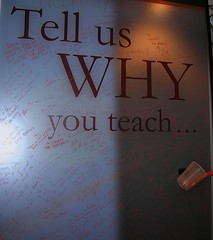
WHY do YOU teach?


Tell us WHY you teach!
Originally uploaded by charlenechausis
One of my favorite things at NECC this year was the random placement of these acrylic boards, with grease pencils in a cup, inviting participants to share WHY they teach.

Here are some of the comments written:
* For the aha moments!
* For our children.
* To help a child see opportunities!
* To learn more myself.
* Because I love children.
* Making a difference can't be beat.
It just inspires me.
Because I want to change the world.

How about YOU?