Hopping on the bandwagon...
Last week, Representative Fitzpatrick (R-PA) introduced: "H.R. 5319: To amend the Communications Act of 1934 to require recipients of universal
service support for schools and libraries to protect minors from commer-
cial social networking websites and chat rooms." (See the Library of Congress website)
This legislation proposes that anyone under 18 be prohibited from using school or library computers to access Web sites that create public "Web pages or profiles" and also offer a discussion board, chat room, or e-mail service.
While it seems that the target is websites like MySpace or Facebook, if passed, this could also prevent students from accessing blogging websites such as Blogger, LiveJournal and Xanga. At Stevenson, I know of several teachers and students that actively discuss educational topics outside of the classroom in this forum.
For instance, recently our AP Government teachers broadcasted an AP exam review "event" on Stevenson's local radio station. Students also "tuned into" the teachers' blog site, CitizenU.org, to post questions and discussions during the live radio show.
Can social networks be dangerous for students?
What are our responsibilities as educators?
There are several websites interested in your feedback, such as Technology & Learning magazine's TechLearning.com "Question of the Week" at:
http://news.techlearning.com/cgi-bin4/DM/y/ewXU0FQcUI0E2V0B7Kk0Ed
Also Mobilize.org (Mobilizing America's Youth) has launched an "SOS" campaign: "Save Our Social Networks" -- see details at: http://www.mobilize.org/SOS
Tuesday, May 16, 2006


Tuesday, May 09, 2006
Imagination ^3

In June of 2002 I was delighted to learn that Figment, Disney's playful purple dragon, would be returning to EPCOT to once again demonstrate the power of imagination. The revamped "Journey to the Imagination" attraction also saw the return of "One Little Spark," an uplifting song written by legendary Disney composers Richard M. and Robert B. Sherman for the attraction’s original opening in March 1983.
Ok, enough reminiscing ... fast-forward to present-day Web 2.0 collaborative tools, and check out General Electric's ImaginationCubed.com website! Not only can you write and draw on this free online electronic whiteboard, you can invite your friends to collaborate with you either by email or Chat (AIM), and then save it, print it or email the finished piece. Then when you return to the board, you can watch it redraw before your very eyes!
Come and stretch your imagination with me...
Tuesday, May 02, 2006
Create Your Own Motivational Posters!
With "Motivator," one of "fd's Flickr toys" (from FlagrantDisregard.com) you "have the power to turn a simple photograph into an inspirational message that will burn forever in the hearts and minds of dozens." You can use any digital image, add a motivational word and some proverbial wisdom, and click to create your own printable poster. Of course, fd is willing to sell you the full poster size print for a mere $12.99 as well.

Fellow educator John Blake posted these ideas for using Motivator to help students with literary terms, http://theedublog.blogspot.com/2006/04/friday-symposiums-at-nwa.html
Just look beyond the adlinks....
Fellow educator John Blake posted these ideas for using Motivator to help students with literary terms, http://theedublog.blogspot.com/2006/04/friday-symposiums-at-nwa.html
Just look beyond the adlinks....
Tuesday, April 25, 2006
Copyright -- Fair Use vs. Creative Commons
At last week's PowerRanger meeting we reviewed "copyright." In the USA, original work (also referred to as intellectual property) created since March 1, 1989 is assumed to be copyrighted, whether or not it has a notice attached.
Copyright infringement can occur by using or reproducing someone's creative work without their permission. However, section 107 of copyright law provides guidelines for the "fair use" of intellectual property "for purposes such as criticism, comment, news reporting, teaching… or research." Teachers and students need to be aware of these guidelines, and of the "four factors" used to determine the "educational" fair use of intellectual property.
We discussed two scenarios and debated whether or not the teacher or student in our "examples" was in violation of copyright infringement. My disclaimer in these discussions continues to be that, "I am not an attorney." I can only share my understanding of copyright infringement, and let you know that lawsuits are determined on a case-by-case basis.
I also shared information about the "Creative Commons," a nonprofit organization founded in 2001 to help "people dedicate their creative works to the public domain -- or retain their copyright while licensing them as free for certain uses, on certain conditions.... Creative Commons' first project, in December 2002, was the release of a set of copyright licenses free for public use... this will enable people to ... find, for example, photographs that are free to use provided that the original photographer is credited, or songs that may be copied, distributed, or sampled with no restrictions whatsoever."
This organization is gaining momentum, as you will notice the "Creative Commons" badge displayed on a number of websites, including this blog. Students and teachers also have the ability to search the internet using Google and Yahoo, to locate digital resources tagged with a Creative Commons license. What a great way to promote responsible "digital" citizens!
For more information, visit the http://creativecommons.org website, or the creativecommons.org search page at: http://creativecommons.org/find/
Copyright infringement can occur by using or reproducing someone's creative work without their permission. However, section 107 of copyright law provides guidelines for the "fair use" of intellectual property "for purposes such as criticism, comment, news reporting, teaching… or research." Teachers and students need to be aware of these guidelines, and of the "four factors" used to determine the "educational" fair use of intellectual property.
We discussed two scenarios and debated whether or not the teacher or student in our "examples" was in violation of copyright infringement. My disclaimer in these discussions continues to be that, "I am not an attorney." I can only share my understanding of copyright infringement, and let you know that lawsuits are determined on a case-by-case basis.
I also shared information about the "Creative Commons," a nonprofit organization founded in 2001 to help "people dedicate their creative works to the public domain -- or retain their copyright while licensing them as free for certain uses, on certain conditions.... Creative Commons' first project, in December 2002, was the release of a set of copyright licenses free for public use... this will enable people to ... find, for example, photographs that are free to use provided that the original photographer is credited, or songs that may be copied, distributed, or sampled with no restrictions whatsoever."
This organization is gaining momentum, as you will notice the "Creative Commons" badge displayed on a number of websites, including this blog. Students and teachers also have the ability to search the internet using Google and Yahoo, to locate digital resources tagged with a Creative Commons license. What a great way to promote responsible "digital" citizens!
For more information, visit the http://creativecommons.org website, or the creativecommons.org search page at: http://creativecommons.org/find/
Tuesday, April 18, 2006
Your Tax Dollar$ at Work!
Since our federal taxes were due yesterday, I thought it might be fitting to share this FREE website, made possible by Uncle Sam:
What is FREE?
FREE = Federal Resources for Educational Excellence
More than 30 Federal agencies formed a working group in 1997 to make hundreds of Federally supported teaching and learning resources easier to find. The result of that work is the FREE web site.
Visit: http://www.ed.gov/free
You will find resources for a variety of subjects: Arts, Educational technology, Foreign languages, Health, Language Arts, Mathematics, Physical Education, Science, Social studies, and Vocational education. Subscribe to the RSS feed for "New Resources," or browse the resources by Subject, Archives, or use the Site Search tool.
Check out the "Special Collections" page with topics such as "Financial Literacy: Learn the basics about getting the most out of your money—saving, investing, banking, buying a home, balancing your checkbook, and more. Find out about mutual funds and the Federal Reserve. Try an online retirement calculator. Test your 'financial smarts.'"
There is also a page organized just for students.
What is FREE?
FREE = Federal Resources for Educational Excellence
More than 30 Federal agencies formed a working group in 1997 to make hundreds of Federally supported teaching and learning resources easier to find. The result of that work is the FREE web site.
Visit: http://www.ed.gov/free
You will find resources for a variety of subjects: Arts, Educational technology, Foreign languages, Health, Language Arts, Mathematics, Physical Education, Science, Social studies, and Vocational education. Subscribe to the RSS feed for "New Resources," or browse the resources by Subject, Archives, or use the Site Search tool.
Check out the "Special Collections" page with topics such as "Financial Literacy: Learn the basics about getting the most out of your money—saving, investing, banking, buying a home, balancing your checkbook, and more. Find out about mutual funds and the Federal Reserve. Try an online retirement calculator. Test your 'financial smarts.'"
There is also a page organized just for students.
Tuesday, April 11, 2006
Ajax -- stronger than dirt?
If you grew up in the '60s, you may remember having back yards filled with clothing hung out to dry on lines stretched between poles, porches, fences or buildings. Remember, too, the Ajax white knight, who rode through neighborhoods "zapping" laundry to magically transform dingy whites into sparkling whites? The peer pressure among homemakers was intense. After all, everyone in the neighborhood could critique your laundering prowess. These are the images that come to mind when I hear the word "Ajax."
Fast forward to the 21st Century!! Although the laundry detergent and household cleanser from my youth are still available, in this day and age, Ajax has a totally new meaning. It is an acronym for "Asynchronous JavaScript And XML" which, according to "Wikipedia," is a web development technique for creating interactive web applications, such as ajaxWrite: http://ajaxwrite.com.
Free to use, no sign up required, and nothing to install, ajaxWrite is a "streamlined word processor, comparable to Microsoft Word with ... functions you use most often, right where you'd expect them to be. You can import and export documents in all popular formats, including documents with graphics. The save function lets you save your work to a drive on your computer. Also, since you run ajaxWrite from your web browser, it is platform independent and can therefore be used with any operating system." Note: ajaxWrite only works in Firefox.
What intrigued me the most was the statement regarding the "ability to import documents in all popular formats." I have been looking long and hard for an easy way to convert Microsoft Works files, for editing on the Macintosh. Although there is a "Works to Word" converter for Windows, no such utility exists for the Mac. Word on the Mac can open Works files, but only as text, and so formatting and structure is not preserved.
Well, I was excited to test some sample student papers I've been holding onto. Unfortunately, when I tried to upload a document, my browser froze and I had to force quit. So, it seems there are a few bugs yet to be ironed out.
I am hopeful that perhaps in the near future, ajaxWrite will provide the solution for working with Microsoft Works files that students have brought to school to print out, or to finish up, but neglected to "Save as ..." Microsoft Word before they left home. Perhaps ajaxWrite will be our "knight in shining armor" very soon!
Fast forward to the 21st Century!! Although the laundry detergent and household cleanser from my youth are still available, in this day and age, Ajax has a totally new meaning. It is an acronym for "Asynchronous JavaScript And XML" which, according to "Wikipedia," is a web development technique for creating interactive web applications, such as ajaxWrite: http://ajaxwrite.com.
Free to use, no sign up required, and nothing to install, ajaxWrite is a "streamlined word processor, comparable to Microsoft Word with ... functions you use most often, right where you'd expect them to be. You can import and export documents in all popular formats, including documents with graphics. The save function lets you save your work to a drive on your computer. Also, since you run ajaxWrite from your web browser, it is platform independent and can therefore be used with any operating system." Note: ajaxWrite only works in Firefox.
What intrigued me the most was the statement regarding the "ability to import documents in all popular formats." I have been looking long and hard for an easy way to convert Microsoft Works files, for editing on the Macintosh. Although there is a "Works to Word" converter for Windows, no such utility exists for the Mac. Word on the Mac can open Works files, but only as text, and so formatting and structure is not preserved.
Well, I was excited to test some sample student papers I've been holding onto. Unfortunately, when I tried to upload a document, my browser froze and I had to force quit. So, it seems there are a few bugs yet to be ironed out.
I am hopeful that perhaps in the near future, ajaxWrite will provide the solution for working with Microsoft Works files that students have brought to school to print out, or to finish up, but neglected to "Save as ..." Microsoft Word before they left home. Perhaps ajaxWrite will be our "knight in shining armor" very soon!
Tuesday, April 04, 2006
Teaching and Learning through video
With the popularity of "videos-to-go" (ala iPod), educators have the potential to grab students' attention beyond the classroom. Of course, competing with flashy music videos may be challenging, educational videos are certainly worth exploring! Our subscription to UnitedStreaming provides an excellent foundation for extending learning beyond the classroom. And, many of the videos have editing "rights," allowing subscribers to edit the content, such as providing custom narration (why not have the students rewrite these). If you don't have a login yet, visit my Patriot public folder for access information.
And, for further exploration, check out Google Video. Advertised as "the world's first open online video marketplace, where you can search for, watch and even buy an ever-growing collection of TV shows, movies, music videos, documentaries, personal productions and more." Search for your favorite topic and watch brief previews on the search results page."Clicking on a thumbnail image will take you to a playback page, where you can watch the preview or, for free content, the video itself. In addition to viewing free content, you can also purchase or rent premium content at the Google Video store using your Google Account."
Thanks to Google Video and the National Archives, visit NARA on Google Video for links to old NASA footage, United newsreels, and Department of the Interior films.
And, for further exploration, check out Google Video. Advertised as "the world's first open online video marketplace, where you can search for, watch and even buy an ever-growing collection of TV shows, movies, music videos, documentaries, personal productions and more." Search for your favorite topic and watch brief previews on the search results page."Clicking on a thumbnail image will take you to a playback page, where you can watch the preview or, for free content, the video itself. In addition to viewing free content, you can also purchase or rent premium content at the Google Video store using your Google Account."
Thanks to Google Video and the National Archives, visit NARA on Google Video for links to old NASA footage, United newsreels, and Department of the Interior films.
Tuesday, March 28, 2006
Spring Break at E^2 -- Tune up those minds!
Well it's Spring Break at Stevenson, and hopefully teachers and students are being energized for the end of the year learning. I recently read that many exciting and memorable projects often take place at this time in the school year. Right now, the push is for testing... so, here's a resource that appeared in the Six Pack two years ago, and unlike many web resources, has survived the test of time, and remains a valuable learning tool.
Quiddler Student Worksheet
-----------------------------------------
Looking for a simple way to introduce brain boosters and critical thinking into your everyday activities? Try this daily Quiddler worksheet to get your students thinking about words in a whole new light. Visit: http://www.setgame.com/puzzle/quiddler_work_sheet.htm or http://www.setgame.com/quiddler (either print it out or "play" online).
Quiddler Student Worksheet
-----------------------------------------
Looking for a simple way to introduce brain boosters and critical thinking into your everyday activities? Try this daily Quiddler worksheet to get your students thinking about words in a whole new light. Visit: http://www.setgame.com/puzzle/quiddler_work_sheet.htm or http://www.setgame.com/quiddler (either print it out or "play" online).
Tuesday, March 21, 2006
Revisting an old favorite: HPR*TEC
HPR*TEC stands for High Plains Regional Technology in Education Consortium.
http://www.hprtec.org/
While I am hooked into learning about emerging technologies, I sometimes forget about resources that have survived beyond the commercialization of the web, and the "dot.bomb" age and still provide access to wonderful (and still free) resources for education.
Some of the HPR*TEC resources include solutions such as ...
4Teachers:
4Teachers.org works to help you integrate technology into your classroom by with tools and resources such as RubiStar, QuizStar, TrackStar, NoteStar, Project Poster, and more! This site helps teachers locate and create ready-to-use Web lessons, quizzes, rubrics and classroom calendars. There are also tools for student use. Discover valuable professional development resources addressing issues such as equity, ELL, technology planning, and at-risk or special-needs students.
http://www.4teachers.org
and...
Casa Notes:
Designed to allow teachers to quickly make, and customize, typical notes that are sent home to parents or given to the students. This is done by using templates and allowing the teachers to customize some of the content, choose a color scheme and add a graphic. The notes can be printed in English or in Spanish.
http://casanotes.4teachers.org/
View the complete list at: http://www.hprtec.org/solutions/
http://www.hprtec.org/
While I am hooked into learning about emerging technologies, I sometimes forget about resources that have survived beyond the commercialization of the web, and the "dot.bomb" age and still provide access to wonderful (and still free) resources for education.
Some of the HPR*TEC resources include solutions such as ...
4Teachers:
4Teachers.org works to help you integrate technology into your classroom by with tools and resources such as RubiStar, QuizStar, TrackStar, NoteStar, Project Poster, and more! This site helps teachers locate and create ready-to-use Web lessons, quizzes, rubrics and classroom calendars. There are also tools for student use. Discover valuable professional development resources addressing issues such as equity, ELL, technology planning, and at-risk or special-needs students.
http://www.4teachers.org
and...
Casa Notes:
Designed to allow teachers to quickly make, and customize, typical notes that are sent home to parents or given to the students. This is done by using templates and allowing the teachers to customize some of the content, choose a color scheme and add a graphic. The notes can be printed in English or in Spanish.
http://casanotes.4teachers.org/
View the complete list at: http://www.hprtec.org/solutions/
Tuesday, March 14, 2006
Listen to some Poetry !!
I have recently discovered the Poetry Archive (http://www.poetryarchive.org) -- the largest online collection of recording of poets reading their own work. You can listen to writers such Langston Hughes, Rudyard Kipling, Alfred Tennyson, William Butler Yeats, plus dozens of contemporary English-language poets. There’s a special area for children’s poetry, plus resources for teachers. Oh, and it's free!!
Tuesday, March 07, 2006
IL-TCE Presentation -- Online!
Last Thursday and Friday (3/2 & 3/3/2006) I presented two sessions at the Illinois Technology Conference for Educators in St. Charles, IL. This year, more than 1700 attended (and that was just the Thursday count)! My session on Thursday was titled, "Social Technologies for the Classroom?" in which I shared a number of web resources that can be used for collaborating between teachers and students.
Please feel free to check out my "online handout" which includes an audio file of the presentation, so you can listen and follow along by clicking the webpage links with me.
We are truly living in an "information age" -- more than ever before, teachers and students have access to an abundance of resources that make it easy to contribute to the "education conversation" as producers and publishers of knowledge!!
Please feel free to check out my "online handout" which includes an audio file of the presentation, so you can listen and follow along by clicking the webpage links with me.
We are truly living in an "information age" -- more than ever before, teachers and students have access to an abundance of resources that make it easy to contribute to the "education conversation" as producers and publishers of knowledge!!
Tuesday, February 28, 2006
M-m-m-m-m-m del.icio.us!!
Here's something to whet your appetite! del.icio.us is a free online "Social bookmarking" site. Perhaps some of you may have heard of other online bookmarking services such as Backflip or Furl. What makes del.icio.us especially yummy? Anyone can browse del.icio.us and see what others find interesting.
del.icio.us will:
* Keep links to your favorite articles, blogs, music, restaurant reviews, and more on del.icio.us and access them from any computer on the web.
* Share favorites with friends, family, and colleagues.
* Discover new things. Everything on del.icio.us is someone's favorite - they've already done the work of finding it. Explore and enjoy.
From the website:
Joshua Schachter created del.icio.us in 2003 as a hobby and an informal way to tag and share Web pages between friends. From that point on, del.icio.us rapidly grew into the social bookmarking service it is today, and in 2005 officially became a company - del.icio.us, Inc.
In December of 2005, Yahoo! acquired del.icio.us and pledged to provide the company with the resources, support, and room it needs to continue growing the service and community.
Visit: http://del.icio.us/ to sign up. I have added some of my del.icio.us links along the bottom left corner of this blog page, or visit directly at: http://del.icio.us/cchausis
del.icio.us will:
* Keep links to your favorite articles, blogs, music, restaurant reviews, and more on del.icio.us and access them from any computer on the web.
* Share favorites with friends, family, and colleagues.
* Discover new things. Everything on del.icio.us is someone's favorite - they've already done the work of finding it. Explore and enjoy.
From the website:
Joshua Schachter created del.icio.us in 2003 as a hobby and an informal way to tag and share Web pages between friends. From that point on, del.icio.us rapidly grew into the social bookmarking service it is today, and in 2005 officially became a company - del.icio.us, Inc.
In December of 2005, Yahoo! acquired del.icio.us and pledged to provide the company with the resources, support, and room it needs to continue growing the service and community.
Visit: http://del.icio.us/ to sign up. I have added some of my del.icio.us links along the bottom left corner of this blog page, or visit directly at: http://del.icio.us/cchausis
Tuesday, February 21, 2006
New! Google Scholar - on the shoulders of giants...
Here is a new tool that we can send our students (and ourselves to) - Google Scholar!
From the website: What is Google Scholar?
"Google Scholar provides a simple way to broadly search for scholarly literature. From one place, you can search across many disciplines and sources: peer-reviewed papers, theses, books, abstracts and articles, from academic publishers, professional societies, preprint repositories, universities and other scholarly organizations. Google Scholar helps you identify the most relevant research across the world of scholarly research. ... It's our acknowledgement that much of scholarly research involves building on what others have already discovered. This invitation is taken from Sir Isaac Newton's famous quote, 'If I have seen further, it is by standing on the shoulders of giants.'"
For optimum results, visit: http://scholar.google.com and be sure to click the link to "Advanced Scholar Search" to fine-tune your criteria!!
From the website: What is Google Scholar?
"Google Scholar provides a simple way to broadly search for scholarly literature. From one place, you can search across many disciplines and sources: peer-reviewed papers, theses, books, abstracts and articles, from academic publishers, professional societies, preprint repositories, universities and other scholarly organizations. Google Scholar helps you identify the most relevant research across the world of scholarly research. ... It's our acknowledgement that much of scholarly research involves building on what others have already discovered. This invitation is taken from Sir Isaac Newton's famous quote, 'If I have seen further, it is by standing on the shoulders of giants.'"
For optimum results, visit: http://scholar.google.com and be sure to click the link to "Advanced Scholar Search" to fine-tune your criteria!!
Tuesday, February 14, 2006
Collaborating with a Wiki?
One of the reasons that this "blog" exists is because "Blogger.com" freely provides space on the web for me to publish my thoughts, ideas and inspirations. Blogs are a wonderful part of the "Web 2.0" -- social technology!
Blogs can....
1. give you and/or your students a "voice" in global conversations
2. be tracked or "subscribed" to using RSS technology (RSS = Really Simple Syndication). (look for my RSS icon on the left)
Your thoughts and ideas can be "viewed at will" using a subscription manager (an aggregator) such as Bloglines.com which can be used to view all of your favorite blogs on one page. Imagine students publishing their thoughts and ideas, which you then "subscribe to" and view all of their entries in one "organized" space. (Click the Bloglines icon on the left to add this blog to your subscriptions!)
Another feature of a blog is that, often, your subscribers or visitors are able to provide feedback by leaving a comment about what you have written. So, a blog is much more than a webpage -- it becomes a tool for "conversation."
Hmmm.... let's think about ways to extend this conversation. Suppose your visitors could go beyond commenting on the thoughts in your blog, and re-write what you have written! Enter the world of wikis!
A wiki could be thought of as a virtual sandbox on the web. I draw in the sand, and you come along and add to my creation, enhancing my work with your talents! You can experiment or launch a wiki page using PBwiki. Their tagline is, “PBwiki makes creating a wiki as easy as making a peanut butter sandwich”.
Visit PBwiki.com to set up a PBwiki -- it's free and takes only 10 seconds.
Go forth and play in the sand!
Blogs can....
1. give you and/or your students a "voice" in global conversations
2. be tracked or "subscribed" to using RSS technology (RSS = Really Simple Syndication). (look for my RSS icon on the left)
Your thoughts and ideas can be "viewed at will" using a subscription manager (an aggregator) such as Bloglines.com which can be used to view all of your favorite blogs on one page. Imagine students publishing their thoughts and ideas, which you then "subscribe to" and view all of their entries in one "organized" space. (Click the Bloglines icon on the left to add this blog to your subscriptions!)
Another feature of a blog is that, often, your subscribers or visitors are able to provide feedback by leaving a comment about what you have written. So, a blog is much more than a webpage -- it becomes a tool for "conversation."
Hmmm.... let's think about ways to extend this conversation. Suppose your visitors could go beyond commenting on the thoughts in your blog, and re-write what you have written! Enter the world of wikis!
A wiki could be thought of as a virtual sandbox on the web. I draw in the sand, and you come along and add to my creation, enhancing my work with your talents! You can experiment or launch a wiki page using PBwiki. Their tagline is, “PBwiki makes creating a wiki as easy as making a peanut butter sandwich”.
Visit PBwiki.com to set up a PBwiki -- it's free and takes only 10 seconds.
Go forth and play in the sand!
Tuesday, February 07, 2006
PowerPoint as a Countdown Timer?
Think about using PowerPoint as a "countdown timer" for tests, or discussion timers, speech timers, and more. Add some free music or clock sounds to make it more interesting.
1. Create a series of slides with text containing: "5 minutes" - "4 minutes" - "3 minutes" - "2 minutes" - "1 minute" --- and onto the 10 second increments.
2. Set the "timing" in the side transition menu accordingly.
But wait, why recreate the wheel? I'll just bet there are some already out on the web....
Try this: From the Google search page, click the "Advanced search" options. Enter "Timer" in the Find results "all of the words" field, then from the "File Format" options, drop down to select "Microsoft PowerPoint (.ppt).
After you have downloaded the "gems" of others, why not consider posting your favorite PowerPoint files on the web to share?
1. Create a series of slides with text containing: "5 minutes" - "4 minutes" - "3 minutes" - "2 minutes" - "1 minute" --- and onto the 10 second increments.
2. Set the "timing" in the side transition menu accordingly.
But wait, why recreate the wheel? I'll just bet there are some already out on the web....
Try this: From the Google search page, click the "Advanced search" options. Enter "Timer" in the Find results "all of the words" field, then from the "File Format" options, drop down to select "Microsoft PowerPoint (.ppt).
After you have downloaded the "gems" of others, why not consider posting your favorite PowerPoint files on the web to share?
Tuesday, January 31, 2006
Furl it and forget it!
Furl.net is a nifty Internet tool that enables you to save a copy of any page on the Web. Even if the link goes dead, you can still access the full text of the page, from any computer. Once saved, find any page again instantly using Furl's powerful full-text search. It's like having your own Personal Web or memory tool. Furl it and forget it. You can find all those important websites you've saved and share the sites with anyone else. Visit: http://www.furl.net to subscribe.
Tuesday, January 24, 2006
At last... Google Earth for the Mac!
It's almost as good as being there.
Google Earth was release for the Mac on January 10, 2006 -
What is it?
A place to virtually explore, search and discover... Google Earth combines satellite imagery and maps -- putting the world's geographic information at your fingertips. "Fly" from space to your neighborhood. Type in an address and "zoom" right in. Search for schools, parks, restaurants, and hotels. Get driving directions. Tilt and rotate the view to see 3D terrain and buildings. Save and share your searches and favorites. Even add your own annotations.
Drawback? You need OS 10.4 (Tiger) -- coming soon to a desktop or laptop near you (next year's OS).
Download your copy today at: http://earth.google.com/
Google Earth was release for the Mac on January 10, 2006 -
What is it?
A place to virtually explore, search and discover... Google Earth combines satellite imagery and maps -- putting the world's geographic information at your fingertips. "Fly" from space to your neighborhood. Type in an address and "zoom" right in. Search for schools, parks, restaurants, and hotels. Get driving directions. Tilt and rotate the view to see 3D terrain and buildings. Save and share your searches and favorites. Even add your own annotations.
Drawback? You need OS 10.4 (Tiger) -- coming soon to a desktop or laptop near you (next year's OS).
Download your copy today at: http://earth.google.com/
Tuesday, January 17, 2006
Finally, WMV plays on Mac!
Thanks to the good folks at Flip4Mac,
Since Microsoft's Windows Media Player for Mac is going the way of IE for Mac, this great plug-in for QuickTime allows Macs to play WMV files with QuickTime. it works REALLY well, and even Microsoft is recommending it for Mac users. It actually works better than Microsoft's own product. It is available here for free at:
http://www.flip4mac.com/
Also, for a very reasonable cost from Flip4Mac: a WMV to QT converter! Bring your WMV files into iMovie for editing!
Since Microsoft's Windows Media Player for Mac is going the way of IE for Mac, this great plug-in for QuickTime allows Macs to play WMV files with QuickTime. it works REALLY well, and even Microsoft is recommending it for Mac users. It actually works better than Microsoft's own product. It is available here for free at:
http://www.flip4mac.com/
Also, for a very reasonable cost from Flip4Mac: a WMV to QT converter! Bring your WMV files into iMovie for editing!
Tuesday, January 10, 2006
iSquint from Tyler Loch
Did you get a Video iPod for the holidays? Check out iSquint for converting movies for your iPod!
This easy to use and FREE app was written by Tyler Loch, who if the name sounds vaguely familiar, happens to be the son of Stevenson teacher Tom Loch. Tyler is brilliant, and was an Apple employee (Genius bar) but had to leave his job due to a conflict of interest as a result of his work on this application. Donations are encouraged!
http://www.apple.com/downloads/macosx/ipod_itunes/isquint.html
You can download from the Apple page, Version Tracker, or from the iSquint website:
http://www.isquint.org/
This easy to use and FREE app was written by Tyler Loch, who if the name sounds vaguely familiar, happens to be the son of Stevenson teacher Tom Loch. Tyler is brilliant, and was an Apple employee (Genius bar) but had to leave his job due to a conflict of interest as a result of his work on this application. Donations are encouraged!
http://www.apple.com/downloads/macosx/ipod_itunes/isquint.html
You can download from the Apple page, Version Tracker, or from the iSquint website:
http://www.isquint.org/
Tuesday, December 20, 2005
Annotating on Flickr
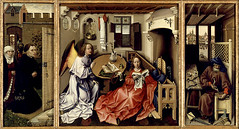
The whole Merode Altarpiece
Originally uploaded by beth h..
Here's a great example of the annotation feature in Flickr .
Flickr allows users to not only post pictures for others to see, but to also provide annotations to further explain the photo.
There are many "copyright friendly" photos for use in education through the Creative Commons.
Subscribe to:
Posts (Atom)